 Making Customizing Settings for ILM Rules
In SAP NetWeaver ILM
, you can use ILM rules to control periods for the retention of archived data in adherence to legal requirements and for the residence of data in the database of the application system.
ILM Rule
An ILM rule contains the following specifications:
Conditions under which the rule is valid (for example, the system ID, client, or additional condition fields)
Duration of the period to be determined (for retention rules: minimum and maximum duration)
Time reference and time offset for determining the start date
ILM store (for retention rules)
Rule number and rule priority
Settings and Definitions of ILM Rules: Overview
ILM rules are based on cross-client Customizing settings. However, in the application system, they are defined as client-specific. The following figure (which is explained below) shows the hierarchy of all settings and relationships that are required for defining ILM rules.
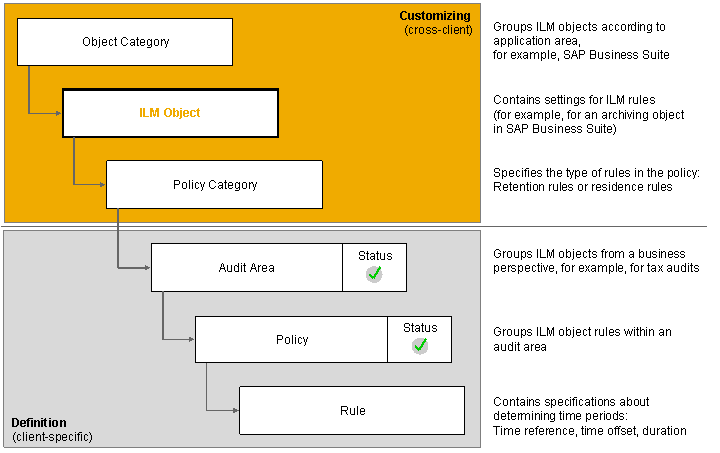
Hierarchy of Settings for ILM Rules
Cross-Client Customizing Settings for ILM Rules
All settings for the use of ILM rules on an ILM-enabled archiving object (or the related data objects) are defined in an ILM object. ILM objects are bundled in object categories according to their application area. For example, all ILM objects relevant for SAP Business Suite belong to one object category. You can specify which type of rule (policy categories) can be defined for each ILM object.
Client-Specific Definition of ILM Rules
Before you define an ILM rule for ILM objects, you need to assign ILM objects to audit areas. You specify the ILM rules for policy categories available for the ILM object within an audit area. Each policy has a unique name within the audit area. In this way, you can define policies with different rules for an ILM object within the audit area, for example, to portray country-specific retention periods.
Changeability of Customizing Settings for ILM Objects
ILM objects that are part of the SAP standard delivery, together with ILM-enabled archiving objects, can only be changed if you are making modifications. If you want to ILM-enable your own archiving objects, you need to define ILM objects for them. Since projects of this type call for complex development activities, you should first discuss them with your SAP consultant.
Rule Engine
The rule engine contained in SAP NetWeaver ILM
(technical name Information Retention Manager
, IRM
for short), uses ILM rules to control all transactions.
Customizing ILM objects (transaction
IRM_CUST)
Definition and management of ILM policies and rules (transaction
IRMPOL)
)Enhancement spot
ES_IRM_CUST
with Business Add-Ins (BAdIs) for value determination of specifications from ILM rules.Evaluation of ILM rules (determination of the start and end dates of a period according to ILM rules)
Procedure
To judge the Customizing settings delivered by SAP for ILM rules and to enhance them if necessary, familiarize yourself with the special features of these settings. You can call up the transaction for Customizing ILM objects as follows:
In the
ILM Retention Management Cockpit
orILM Retention Warehouse Cockpit
for Administrators underServices for Settings
In the implementation guide of the application system with the path

SAP NetWeaver Implementation Guide

Application Server
Basis Services
Information Lifecycle Management
Retention Management
ILM Object Customizing
 (or directly using the transaction code
 IRM_CUST
)
To check the effects of the Customizing settings for ILM rules, familiarize yourself with the functions for defining client-specific ILM rules. Create audit areas and policies for test purposes and simulate the evaluation of the rules.
More information: