 Budget Consistency
Use
This function ensures that the budget stored during budget allocation, updates, and releases are always consistent.
In the standard system, you can only save a budget allocation that is completely free of errors. This applies to all budget versions. In the customizing of Funds Management Government you can deactivate the automatic budget consistency for an FM area and a fiscal year in the step Deactivate budget consistency for annual values and Deactivate budget consistency for overall values . Having done this, you can then save your input, even if it is inconsistent.
You should only deactivate the automatic consistency check if, for example, you want to enter an initial budget allocation for a new fiscal year, but the exact budget allocation for individual funds centers and commitment items is not yet fixed. To ensure that the budget is consistent later, you can total up the budget values up to the top node.
You can check the budget consistency of already save budget versions at any time using program BPDIST04.
Features
To ensure that budget allocation is free of errors, the system checks whether the following conditions are met for each FM account assignment:
Funds center and commitment item hierarchy
Within the hierarchy or subhierarchies, the budget value in the superior levels must be at least as much as the total of the budget values in the subordinate levels (= distributed value on the superior level).
If you are using the Distribute budget function to distribute budget within the hierarchy or subhierarchies, the sender funds center and commitment item must be on a higher level than the receiver.
 ( )
( )
Time level
The total of the annual values per funds center/commitment item combination must not exceed the overall value for that combination. This check is only carried out if you are using annual and overall values. The parameter „Overall value“ must be active in the Budget Profile .
 ( )
( )
Release - current budget
The annual release may not exceed the current annual budget.
The overall release may not exceed the current overall budget.
Releases must be equal to or more than zero.
 ( )
( )
Transfer postings
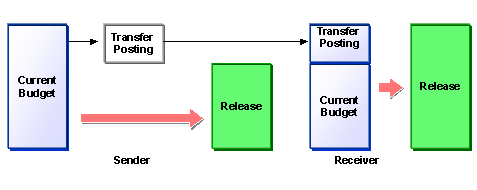
The transfer amount may not exceed the current budget in the sender.Releases already made cannot be transferred.
 ( )
( )
However, if you have activated automated Release in Customizing, the maximum amount that can be transferred from the sender is the amount that has already been released.
Parked budget
If you are working with parked budget, the consistency check is also carried out using the total of the current and parked budget. For more information, read Budget Parking .
Negative budget
Negative budget is only permitted if you have entered negative budget values in the FM account assignments provided for them or if negative residual budget is carried forward from the old year to the new year in the Budget Carryforward during year-end closing operations resulting in negative values in the new year.Otherwise, all budget values must be positive.
For more information on entering negative budget values, see Negative Budget .
Availability Control
If availability control is active, the system compares the budget values with the assigned values (actual plus commitment) and triggers the appropriate action (warning, warning with mail to budget manager, error message) if the tolerance limits defined for the budget are exceeded.
Activities
To actively check the budget consistency after budget allocation, choose the corresponding activity (
 Budget/Supplement/Return)
  Check
Check  in the respective transaction.
In the event of an error, the following happens:
Incorrectly budgeted objects are highlighted on the entry screen for the budget values
The system also generates a message directing your attention to an error log. You can display and print the error log by choosing
Extras Error log
. You can call up an explanatory text by choosing
Long text
or by double-clicking a line in the log.
To check the budget consistency of a budget version that you have already saved, execute the
Budget consistency check
program (BPDIST04). To do this, choose
Accounting Public Sector Management Funds Management Information System Analyses Budget (Former Budgeting) Budget Consistency Check
.