 Editing Participants
You can use this function to add or remove participants to or from a master contract, to display and change the master contract participants, and to display the participant attributes.
Activities
Adding Participants
Select the contract to which you want to assign the new participant (either on or below the node), and choose  (
(Add Participant
).
Removing Participants
Select the participant contract that you want to remove and choose  (
(Remove Participant
).
 Note
Note
Note that the system does not only remove the participant for the contract present point in time, but also for assignments in the future.
Example: Account 123 is a participant in master contract 789 for the period 01/01/2002 - 12/31/2002 and also 03/01/2003 - infinitely. If you remove the account on 10/31/2002, the system removes the assignment in both defined periods.
Displaying Participants
Select the participant contract that you want to display and choose  (
(Display Participant
).
If you display a participant master contract, the system displays the
Display Master Contract: Basic Data
screen.For more information, see Displaying Master Contracts.
If you display a participant account that is managed in
Account Management (FS-AM)
, the system displays theDisplay Account: Basic Data
screen.For more information, see Displaying Accounts.
Changing Participants
Select the participant contract that you want to change and choose  (
(Change Participant
).
If you display a participant master contract, the system displays the
Change Master Contract: Basic Data
screen.For more information, see Changing Master Contracts.
Note
You cannot navigate in change mode from the master contract to a participating account. Instead, you need to use the Change Account
transaction (BCA_CN_ACCT_02
).
For more information, see Changing Accounts.
Displaying or Changing Participant Attributes
If a master contract application has attributes, select the participant contract and choose  (
(Participant Attributes
). You can change the participant attributes as long as you can change the master contract.
When you change participant attributes on a certain date, you can choose whether you also want these changes to apply for the participant attribute in the future. However, this only applies if the periods for the participant attributes entered in the future follow on consecutively from one another.
 Example

Example 1
There are three data records in a master contract for a participant attribute for the periods 01/01/2002 - 01/01/ 2005 (data record A); 01/01/2005 - 02/01/2006 (data record B), and 02/01/2006 - 01/01/2008 (data record C). On 10/01/2004 (contract present) you change data record A, which is valid at this time. You can decide whether this change only applies to data record A or also for the data records B and C stored in the future (system query).
Example
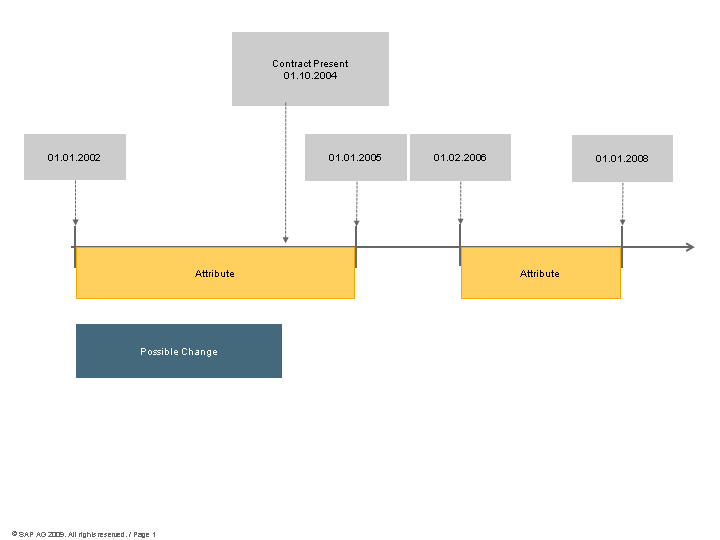
Example 2
There are two data records in a master contract for a participant attribute for the periods 01/01/2002 - 01/01/2005 (data record A) and 01/01/2006 - 01/01/2008 (data record B). On 10/01/2004 (contract present) you change data record A, which is valid at this time. You cannot make this change to data record B at the same time.
More Information
You need to take into account the prerequisites and editing options according to the feature that you are using: