 Editing Contract Relationships for Overdraft Protection
On the Contract Relationships
tab page you can specify the structure of the master contract for the overdraft protection. Specify one funded account and assign at least one funding account. Only checking accounts are allowed to be funded accounts. All account categories are allowed to be funding accounts.
Prerequisites
In Account Management (FS-AM), you have created the funded account and the funding accounts that you want to assign beneath the master contract.
 Note
Note
Note the general prerequisites for master contracts under Editing Contract Relationships and the restrictions in time-dependent editing of contract relationships.
For more information, see the documentation about the contract element Overdraft Protection: Funded/Funding Accounts
.
Procedure
For more information about processing participant contracts, see Editing Participants.
Adding Participants
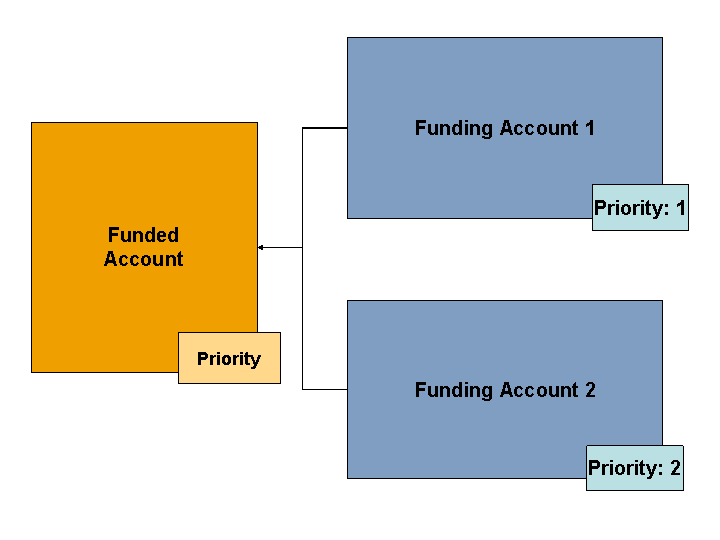
Structure
You chose (
( Add Participant
) and are on the dialog box Change Master Contract: Participant Contract
.
Assigning Funded Accounts
In the
Participant Account
group box, enter the data for the funded account.Enter the priority of the funded account in the
Relationship Attributes
group box. NoteIf you have assigned a funding account to multiple funded accounts in different master contracts, the rank determines the sequence in which the Execute Overdraft Protection report transfers the funds.
End of the note.Choose
Continue
.The system adds the funded account as a participant.
Assigning Funding Accounts
In the
Participant Account
group box, specify the account identification of the funding account. You can assign multiple funding accounts in any order you wish.Specify the type of the funding account.
The system offers you only the funding account types that are allowed according to your Customizing settings for the master contract product.
Specify the rank of the funding account.
To assign multiple funding accounts, you need to specify a different priority for each account. The report
Execute Overdraft Protection
takes the funding account with the lowest priority into account first.Choose
Continue
.The system adds the funding account as a participant.