 Master Contract
Business object in Master Contract Management (FS-MCM) that depicts a number of participating accounts and master contracts arranged in a group or ranking.
You can assign one or more participants to a main master contract. You can restrict the assignment to a certain time.
 Note
Note
Depending on the master contract application, you can also structure multilevel master contract hierarchies with participating accounts and participating master contracts:
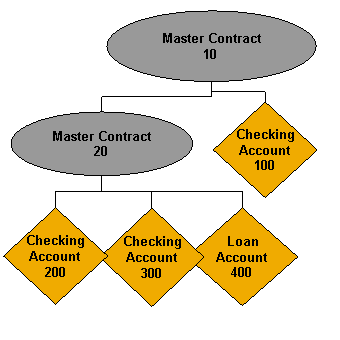
Multilevel Master Contract Hierarchy
Dialog
You can call up the following transactions in the dialog:
Transaction Code |
Short Description |
|---|---|
|
Create Master Contract |
|
Change Master Contract |
|
Display Master Contract |
|
Terminate Master Contract |
|
Display Master Contract Product |
A master contract is a container that does not itself have the functions of a participant account. Postings can only be made to participant accounts and to accounts of participating master contracts. However, the master contract can have attributes such as limits
and financial conditions
.
The system records each change in the master data.
Structure
The system depicts a master contract with contract elements (such as limit management or locks) and business partners. The relationship between the master contract and the participant contracts is also defined by the participant attributes.
Relationship Between Master Contract and Product
A master contract is based on a master contract product. The master contract product is based on the product category Master Contract
. The attributes and contract elements used in the Master Contract
product category determine the scope of functions and descriptive characteristics.
The master contract product can enable further differentiation in the master contract. If it does not allow changes, the master contract must adopt all the default values from the master contract product.
You can activate one or more features
in a master contract product. When you create and change a master contract product, the system checks whether the combination of the selected features is allowed. For more information about the checks, see the documentation for the following function modules:
BCA_API_CN_FEATURE_PROD_CHECK
(Check Product Attributes: Features)BCA_API_CN_FEAT_PC_PROD_CHECK
(Check Product Attributes: Features - Master Contract Category)BCA_API_CN_ACPOOL_CHK_PRDCTG
(Participation Conditions: Master Contract Category)
 Example
In a master contract product, you are not allowed to activate the Overdraft Protection
and Payment Distribution and Monitoring
features at the same time.
You are allowed to activate the Effective Cash Pooling
and Facilities
features at the same time.
For more information about product definition, see Product Management.
Relationship Between Master Contract and Organizational Unit
The Contract Manager
is important for a contract. You assign this when you create the contract. The system generates the following data using this contract managing organizational unit:
Bank Posting Area
Default value for
Contract Calendar 1
Note
Under certain circumstances, you can change the contract manager
. For more information, see Changing the Contract-Managing Organizational Unit.
Contract Relationships
The master contract applications selected for the product of the main master contract control which participants you can use to create the master contract hierarchy. The following overview indicates which account categories are allowed as participating accounts and whether system-external accounts and multilevel master contract hierarchies are allowed.
Master Contract Application |
Allowed account category of the participating account |
External accounts |
Master contract allowed as participant 1) |
|---|---|---|---|
Overdraft Protection |
|
No |
No |
Compensation |
|
Yes |
Yes2) |
Bundle Pricing Calculation |
|
Yes |
No |
Payment Distribution and Monitoring |
|
No |
No |
Combined Statement |
All account categories |
Yes |
No |
Effective Cash Pooling |
|
Yes |
Yes |
Facilities |
|
Yes |
Yes |
Balance Transfer |
All account categories |
Yes |
No |
Determination of Pricing Criteria |
All account categories 3) |
Yes3) |
Yes3) |
1) You must manage participating master contracts in the same logical system as the main master contract. For more information, see Communication with the Master Contract-Managing System. For more information about structuring the master contract hierarchies, see Editing Contract Relationships.
2) If you combined balance transfer and compensation, no master contract is allowed to participate.
3) The relationship to the beneficiary contracts is established by means of the business partner role category of the business partner in the Business Partner for Financial Services (FS-BP), not by means of contract relationships. Beneficiary contracts do not have to participate in the master contract.
Integration
You can process master contracts using the following channels:
Dialog
Direct Input
For more information, see Customizing for Account Management (FS-AM) under

Technical Documentation for Account Management (FS-AM)

Concepts and Guidelines
Migration
Migration Objects
Master Contract
 .
.BAPI
For more information, see the documentation of the corresponding BOR object and its related BAPIs in the BAPI Explorer.
More Information
For more information about contract management, choose Technical Documentation
on the initial screen for master contract processing.