 Historical Data Maintenance
Use
You can edit historical data to ensure that it is kept up-to-date. You can edit both raw data and the demand history. Service Parts Planning (SPP) also offers various planning services that regularly realign the demand history data. It may, for example, be necessary to realign the data when a new bill of distribution (BOD) becomes valid or if you make a new stocking or destocking decision for a location product.
Prerequisites
You have made the settings for historical capture and maintenance .
You have captured the historical data .
Features
The following figures show how the system saves and processes the changed data in the Business Intelligence system (BI system) of SAP Supply Chain Management (SAP SCM), and then provides it to the SPP planning services:
Figure 1 depicts the data flow, if you have loaded order data from SAP Customer Relationship Management (SAP CRM) .
Figure 2 displays the data flow, if you have loaded order and stock transfer data from SAP ERP .
 Note
Note
The only difference between the two data flows is the data source. As soon as the data has been loaded to DataStore object 9ARAWDAT and InfoCube 9ADEMAND, the data is processed in the same way.
Figure 1
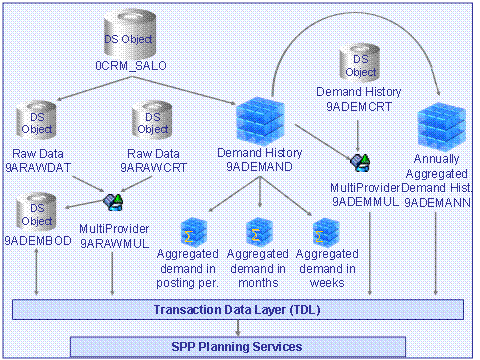
Figure 2
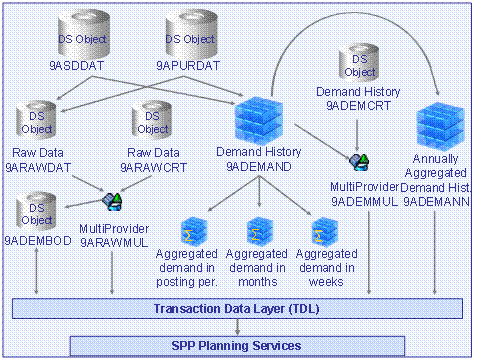
The data that the system captured during historical data capture is saved in the DataStore object 9ARAWDAT and the InfoCube 9ADEMAND.
The InfoCube 9ADEMANN is supplied once a year with the data of the InfoCube 9ADEMAND.
If you adjust the raw data, the system saves your changes in the DataStore object 9ARAWCRT.
NoteThe system saves your changed data in the DataStore object 9ARAWCRT using Real-time Data Acquisition (RDA). Your changes can therefore not be seen immediately, like when data is written to a database. It can last a couple of minutes until the changed data can be seen.
End of the note.If you adjust the demand history, the system saves your changes in the DataStore object 9ADEMCRT.
The captured and changed raw data goes into the MultiProvider 9ARAWMUL. The captured and changed demand history goes into the MultiProvider 9ADEMMUL. This means that data that the system accesses via MultiProviders is always up-to-date and consistent.
The DataStore object 9ADEMBOD contains the demand histories for future BODs. This DataStore object gets its data from the MultiProvider 9ARAWMUL.
The SPP planning services, such as the forecasting service, read the data from the MultiProviders 9ARAWMUL and 9ADEMMUL as well as from the DataStore object 9ADEMBOD and the InfoCube 9ADEMANN via the transaction data layer (TDL).
Manually Adjust Raw Data
For location products, you can see the corresponding sales orders and make changes to the order data.
Note
These changes do not affect the SAP Customer Relationship Management (SAP CRM) or SAP ERP data, they only affect SAP SCM.
You can make manual changes to the raw data on the
SAP Easy Access
screen by choosing

Service Parts Planning (SPP)

Data Administration
Adjust Raw Data
 .
.
For more information, see Adjusting Raw Data .
Manually Adjust the Demand History
In the demand history for location products of a customer-facing location or a parent location, you can change the adjusted history and the adjusted scaled history. Your system takes your changes as the final demand.
You can also mark the demand of a combination of location product and period as promotion. The system takes demand marked as such into the
demand category
PROMO_DEM
.
You can make manual changes to the demand history on the
SAP Easy Access
screen by choosing
Service Parts Planning (SPP)
Environment
Data Administration
Adjust Demand History
.
For more information, see Adjusting the Demand History .
Planning Services for Realigning the Demand History
To ensure that the demand history is always up-to-date, the system automatically adjusts the demand history when various events occur. For more information, see Planning Services for the Realignment of the Demand History .