 Historical Data Capture with SAP CRM
Purpose
You use this process to generate a demand history based on data from SAP Customer Relationship Management (SAP CRM).
In historical data capture, the system loads order data from CRM into the Business Intelligence System (BI system) of SAP Supply Chain Management (SAP SCM). The system processes this raw data according to the requirements of Service Parts Planning (SPP) and consolidates it as a demand history.
Prerequisites
You have made the settings for historical capture and maintenance .
You have maintained DataSource 0CRM_SALES_ORDER_I in SAP CRM and replicated it in the SAP SCM system. There you have copied and activated the mapping of this DataSource in the InfoSource 0CRM_SALES_ORDER_I. You have created and executed an InfoPackage with the update mode
Initialization of the Delta Method
for this InfoSource, and created an InfoPackage with the update modeDelta Update
and scheduled it as a background job.For more information about DataSources, see the SAP Library for
SAP NetWeaver
under
SAP NetWeaver Library

SAP NetWeaver by Key Capability
Information Integration by Key Capability
Business Intelligence
Data Warehousing
Data Acquisition
Data Extraction from SAP Source Systems
DataSource
Transferring BI Content DataSources into Active Version
 .
.
For more information about InfoPackages, see the SAP Library for
SAP NetWeaver
under SAP NetWeaver Library
SAP NetWeaver by Key Capability
Information Integration by Key Capability
Business Intelligence
Data Warehousing
Data Warehouse Management
Scheduler
Creating InfoPackages
.
You have transferred and activated the DataStore object 0CRM_SALO and the InfoSource 80CRM_SALO into SAP SCM. You have created and executed an InfoPackage with the update mode
Initialization of the Delta Update
for this InfoSource, and created an InfoPackage with the update modeInitialization of the Delta Method
and scheduled it as a background job.If you want to load data via a CSV file, you have transferred and activated the InfoSource 9ASPP_CD_CSV_LOAD. You have also created a source system and an InfoPackage with the update mode
Full Update
for this InfoSource.
Process
The following figure shows the data flow during historical data capture as described below:
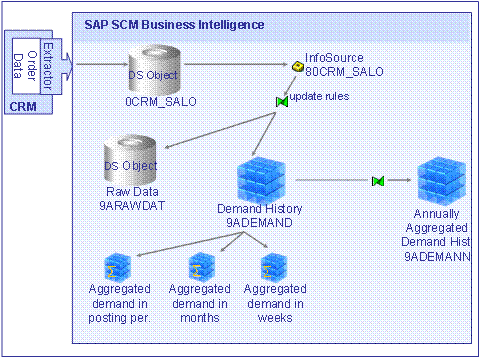
The system extracts SAP CRM sales order data and saves it in the DataStore object 0CRM_SALO. The InfoSource 80CRM_SALO takes its data from this DataStore object.
The system uses update rules to process and checks this data.
For more information, see Update Rules for Historical Data Capture .
The system saves the processed and checked data together with the raw data in the DataStore object 9ARAWDAT and as demand history in the InfoCube 9ADEMAND.
The system captures the demand history in the InfoCube 9ADEMAND as follows:
The system aggregates the demand in weeks.
The system aggregates the demand in months.
The system aggregates the demand in posting periods.
The system aggregates the demand along the BOD.
In doing so the system captures both the demand history of a product at each stockholding location and at each entry location. However, the system only uses the demand history of the stockholding location for forecasting.
The system creates the yearly demand history that both phase-out planning and surplus and obsolescence planning require. To do so, the system uses the data in the InfoCube 9ADEMAND and extracts it into the InfoCube 9ADEMANN. For more information, see Historical Data Capture in Years .
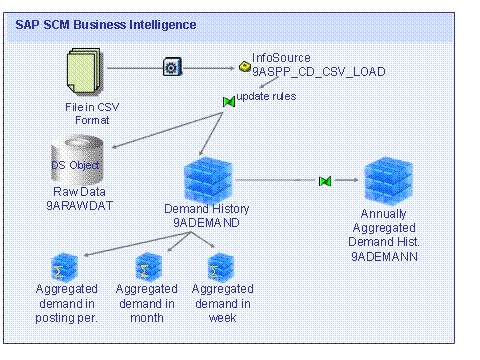
As an alternative to the process described above, you can also load sales order data from other sources, such as from a flat file or a CSV file. The following figure shows the data flow if you load data from a CSV file:
For more information about how you load data from a CSV file, see the SAP Library for
SAP NetWeaver
under
SAP NetWeaver Library
SAP NetWeaver by Key Capabilities
Information Integration by Key Capabilities
Business Intelligence
Data Warehousing
Data Acquisition
Transferring Data from Flat Files
.