

 Displaying the Response Time Distribution
Use
You can analyze the workload of SAP R/3 Systems and non-SAP R/3 systems in the global workload monitor. You can use various
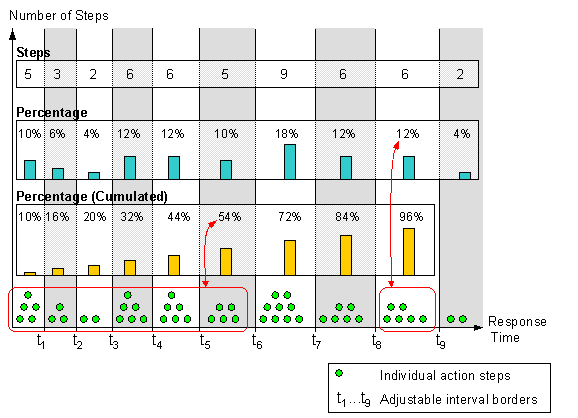
analysis views for SAP R/3 Systems, and various analyses for non-SAP R/3 systems.An analysis always displays an aspect of the system load. One of these aspects is the question of how the response times are distributed with regard to the various service types (for more information about service types, see
Displaying the Workload Overview).To be able to display the response time distribution, the response time of action steps is divided into ten adjustable intervals (see
Setting Parameters for Collecting Statistics). You can choose between the following options when displaying the distribution:Prerequisites
The Internet Transaction Server is currently the only non-SAP R/3 component type for which statistics records are written that can be analyzed in the global workload monitor. We plan to include other component types in the future.
Procedure
 ALV Grid Control.
Result
The output area contains three tab pages with the following properties:
|
Tab Page |
Meaning |
|
Steps |
The system displays the absolute number of transaction steps in each response time category sorted by service type. |
|
Percentage |
The system displays the percentage of transaction steps in each response time category sorted by service type. |
|
Percentage (Cumulated) |
The system displays the percentage of transaction steps with a response time between 0 s and the upper limit of the response time categories, sorted by service type. |
Example
See Also:
Operating the Global Workload Monitor