

 Operating the Global Workload Monitor
Use
The global workload monitor is a one-screen transaction that has as few additional menus as possible. This makes operation easier and more intuitive.
Features
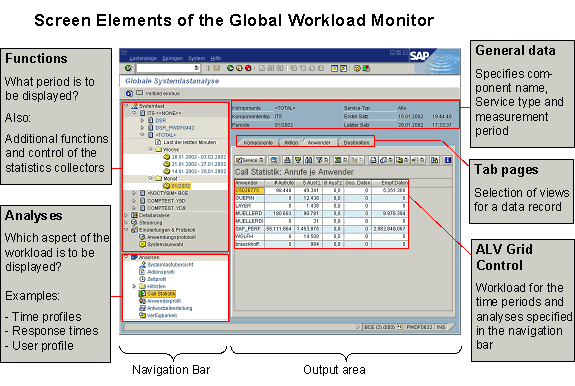
Functions
In the Functions subscreen, choose a symbol by double clicking it:
|
Function |
Meaning |
|
|
Here you can define the component typem, the component, and the time period that you want to analyze. |
|
|
These functions read the workload directly from the statistics files of the individual instances/components. |
|
Here, you can perform a very precise analysis of individual transaction down to the level of individual steps. |
|
This function (transaction STATTRACE) reads the statistical records for any SAP R/3 and DSR components, including those for remote destinations. |
|
|
This section contains functions for database and parameter maintenance for the DSR collector and the DSR performance database. |
|
|
This section contains functions with which you can monitor the error messages of the application yourself, and with which you can define the systems that are to be monitored. |
Analyses
An analysis displays a particular aspect of the workload. In the
analyses subscreen, choose the view that you want to analyze by double clicking it. An analysis corresponds to an analysis view in the SAP R/3 workload monitor, with which you can analyze the workload of your SAP R/3 System.
Only those analyses for which data exists are displayed.
General Data
The system displays general data such as component name, service type, and measurement period (day, week, month, or a user-defined period) at the top of the output area. The date and time of the first and last statistical records in the period being considered.
Tab Pages
You can select various views for a data record using the tab pages. For some analyses, (such as
time profile) the data fields are grouped by topic. The tab page All Data always displays all data fields in a data records in a single table.ALV Grid Control
The output area uses an ALV Grid Control, with which you can greatly tailor the selected view to your requirements. For most load parameters, the global workload monitor displays more data fields than are required for your analysis. You therefore have a considerable amount of help in the output area to obtain the data that is relevant for you:
Using the
standard functions of the ALV Grid Control, you can:


 Detailed analysis

