 Business Event Dates
Business Event Dates
Definition
uses the terms business event and business event date synonymously. A business event date is based on a blueprint or model business event type. In contrast to its event type, a business event date is an actual event scheduled to take place on a specific date in a specific language. It has a start and an end date.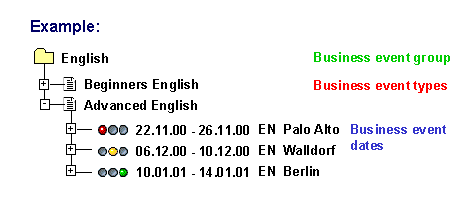
Use
In Training and Event Management, you set up a business event catalog by planning or creating business event dates. Once you have created a business event date, you can make attendance bookings for it.
When you create a business event to be held on a specific date, you must first select a business event type on which to base it. You then enter various types of information for this business event date, such as the event location, or the resources required for it.
It is also possible to create data for a business event by using an existing one as a template to copy from.
When you use the planning function for event dates, you can plan multiple event dates in one step based on the demand that exists for the event.
See also:
Creating a Business Event Date with Resources Creating a Business Event Date Without Resources Planning a Business Event DateStructure
When you create or plan a business event date, you store all of the data required for holding the event, such as:
An internal business event is an event that your company is responsible for organizing. An external business event is organized by a third-party organizer. You cannot plan an external business event, which means that you cannot carry out resource reservation for it. You can only create event dates for it one at a time. When you plan event dates, internal event dates are automatically generated.
You can create event dates in one of two statuses: firmly booked (active) or planned. If you create a business event with the status planned, you can send attendees preliminary confirmation of registration. Later, when you change the status to firmly booked, you can send out definite confirmations. It makes sense to use this option if an event is being planned well in advance and may in fact be canceled before definite confirmations are issued. This allows you to cancel business events before you have definitively confirmed attendance bookings.
As well, when you change the status to firmly booked, waiting-list bookings can be converted to normal bookings, essential bookings, or prebookings.

If you create a business event with the status planned, you must change its status to firmly booked at some point. This is necessary so that follow-up processing can be done.
However, you can also create a business event with the status firmly booked from the start. If you do so, you send out definite confirmation once bookings are made on it.
See also:
Firmly Book Business Event Business Event Follow-Up ProcessingYou can create event dates in locked status. This means that no bookings can be made for these until they are unlocked.
See also:
Lock/Unlock Business EventsIf you are using business event locations, you must enter a location.
You define locations in Customizing for Training and Event Management under
 Create Location. You specify whether you wish to use business event locations at all in the step
Use of business event locations. If you have not set up locations, input is optional.
Create Location. You specify whether you wish to use business event locations at all in the step
Use of business event locations. If you have not set up locations, input is optional.
You must enter the Language in which the event is held.
There are two possible ways to specify the actual time schedule of a business event.
For more information, refer to Creating a Schedule.

You define the schedule patterns necessary for creating a time schedule in Customizing for Training and Event Management under
Define Time Schedule.
Information regarding the number of attendees ( capacity) is automatically inherited from the business event type if this information is available. You can, however, specify a different capacity for the business event itself.
You can specify both an internal price for internal activity allocation purposes and an external price for billing.

If you want to determine a price for the business event, you can use the function
Determine price proposal on this data screen by choosing  .
.
Cost assignment, which involves specifying a controlling area and a cost center, is required for cost transfer posting purposes.
You enter the organizer of the business event. You create organizers of the types organizational unit and company in Customizing for Training and Event Management under
Organizer.
When you create business event dates, you can store more information for them than when you use the planning function (such as number of attendees, price and cost assignment, and organizer data). When you use the planning function, data that has been maintained for the business event type is automatically transferred to the corresponding event date. If you want to override the data of the business event type for event dates you have planned, you can use the function Change Business Event Date.
You can store descriptive or semantic information for a business event here, in the following subtypes of the Description infotype:
General Description, Business Event Contents, Notes.
In addition, you can create links from the event to external information objects using the following infotypes:
Knowledge Link: The Knowledge Link infotype lets you link the business event with objects in the SAP Knowledge Warehouse (such as training materials, CBTs, or videos).
Web Link: The Web Link infotype lets you link any URL addresses on the Internet that contain information that is relevant to the business event.
You can display the info objects that are linked with an event through the Knowledge Link and Web Link infotypes either on the data screen of the business event or in the Employee Self-Service (ESS) applications (if the event is listed in the ESS).
When you create a business event, you can also reserve the resources that are required for it. Resource reservation is optional. You can create an event without reserving resources for it.
When you plan a business event, you make planning specifications regarding resource reservation. These specifications are used to reserve the required resources if available. You can reserve missing resources later with the function Change Business Event Date.
See also:
Creating a Business Event Date with Resources Creating a Business Event Date Without Resources Planning a Business Event Date Business Event Types