 Storage in Secure Areas of Document Management System
Storage in Secure Areas of Document Management System
Use
We use the term secure storage area to define a storage location that, for security reasons, cannot be accessed using the file manager of the frontend computer. The storage data is displayed in the document info record only in the
storage category. The path in the file system as well as the file name are no longer necessary. Original application files that are stored in a secure storage area can therefore only be processed using the Document Management System.Integration
You can only access original application files that are stored in secure storage areas by processing the document info record.
The secure storage areas are defined in Customizing Document distribution and are part of the authorization checks of DMS.

You can also use secure storage areas that are managed by the
 SAP HTTP Content Server 4.5 Interface .
See:
Storage Data in Storage Systems (using the Knowledge Provider)Prerequisites
In Customizing for Document Management, under General data
® Define data carriers, you must define the data carrier types for the data carriers that are to be used as secure storage areas.Features
The following data carrier types are supported as secure storage areas for storing original application files:
Checking an Original Application File into a Secure Storage Area
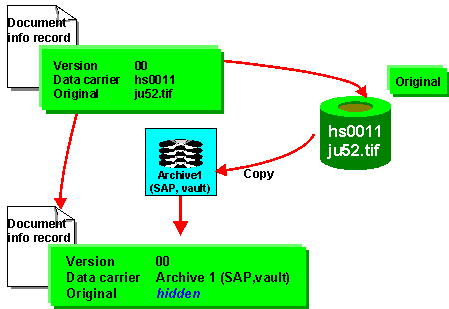
In its processing phase, an original application file is usually to be found on a file server (for example, server hs0011). This file server can be accessed by means of the file manager.
If you have to store certain processing statuses of an original application file (for example, ju52.tif) in a secure storage area, the system creates a copy of the original application file. The storage data of the file in its processing phase (for example, server hs0011) is ignored for further processing in the Document Management System. Once you have checked the original application file into the secure storage area, you can no longer change the workstation application in the File12 field.
The following graphic shows the check-in procedure from a file server to a secure storage area.
Processing in a Secure Storage Area
There are additional checks for
Processing an Original Application File in a Secure Storage Area.By using the
Resetting the Storage Data of Original Application Files function you can reset the processing status of the original application file in the secure storage area to the status it had before it was placed in secure storage.