 Resetting the Storage Data of Original Application Files
Resetting the Storage Data of Original Application Files
Usage
You can use this function to undo changes you have made to an original application file. You can undo all the changes that you made up to the last change status after the original was placed in secure storage. The original file is not retrieved from these storage locations.

An original application file has been checked into the SAP database. You have to make further changes, so you process this original application file (Original 1
While you are changing the file, the file is destroyed or you discover that you have made numerous errors over a period of time. You can undo these erroneous changes and reset the status of the original application file to what it was when it was placed in secure storage.
Integration
This function is for original application files that you have stored in a
Secure Storage Area and then reprocessed.Prerequisites
You can only use this function if an original application file has been checked into a secure storage area.
Scope of the Function
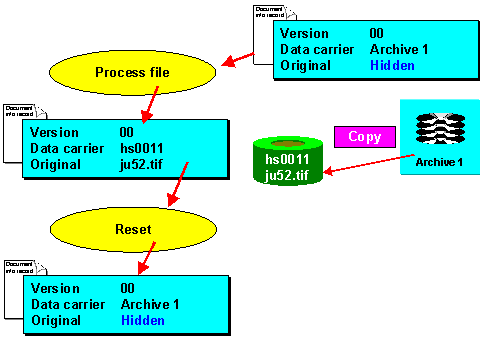
With this function you can undo all your changes and go back to the archived version of the file. The storage data entries for the original application file in the document info record are reverted to their pre-change state.

The Reset original function may also be active if neither a workstation application nor a storage location is entered for the current processing status of a file. This shows you that an original application file was saved to a secure storage area sometime in the past, but the storage data was deleted from the document info record at a later date. You can still reset the Original field.
The following graphic illustrates the Reset original function for a securely stored file.
Activities
The system determines the data carrier on which the original application file was last stored (SAP database, vault, or archive) and copies the description of this data carrier as the storage location.
For example, if the original application file was last stored in an archive, the Data carrier field in the Storage data dialog box contains the description of the archive (for example, Archive 1). For security reasons, you do not see the complete path.
This reset original application file is now available for processing again. If you choose Extras ® Originals ® File 1(2) ® Change again, a dialog box appears in which you can enter a path for the copy.