Scheduler
Definition
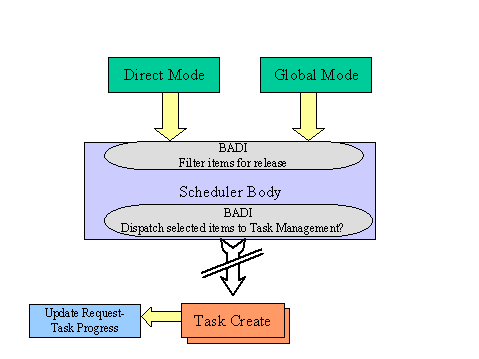
The Scheduler is a program that controls and manages the release of requests . It retrieves data from the request pool and, after applying some checks, triggers task creation .
Use
The Scheduler releases requests according to the relationship between requests and tasks. For instance, several request items may be translated into one task and one request item may be translated into many tasks.
 Note
Note
For more information on the relationships between requests and tasks, see Task .
The Scheduler works in either global mode or direct mode.
Global Mode
The Scheduler has a full view over the whole request pool and can be triggered both manually and externally.
Manual triggering
You can run the Scheduler via the
TRM Monitor
, using the
Create tasks
method at site level. For more information, see
Monitor Methods
.
External triggering
The Scheduler can be externally triggered by running the report RLTRQSCHEDULER through the standard scheduling mechanism. You can schedule batch processes by time.
Direct Mode
The Scheduler has a view of the input request that it gets as a parameter and can be triggered both manually and externally.
Manual triggering
You can run the Scheduler via the TRM Monitor, using the
Create tasks
method for a specific document. For more information, see Monitor Methods.
External triggering
The Scheduler can be externally triggered by the following:
Urgent requests gaining the status of
Available
(This occurs when transfer orders are created or waves are released).Confirmation of any task that is not the final task for a request (request items getting the status of
Confirmed
)
Integration
The operation of the Scheduler can be influenced by the following BAdIs:
LTRM_RQST_GLOBL_SCAN– Allows you to filter request items to be dispatched to Task Management in global mode
LTRM_RQST_DISPATCH– Allows you to decide at the latest point in time whether or not to dispatch the request items to Task Management in global and direct modes
Note
For more information, see the relevant BAdI documentation.