
Self Service Scale - Service Functions
In addition to the item entry functions, the Self Service Scale provides a range of service functions for store personnel.
The Self Service Scale mode allows authorized users to access specific service functions.
Language Selection
The display language can be changed by pressing the language button on the top right corner of the Welcome screen or the tableau screen.
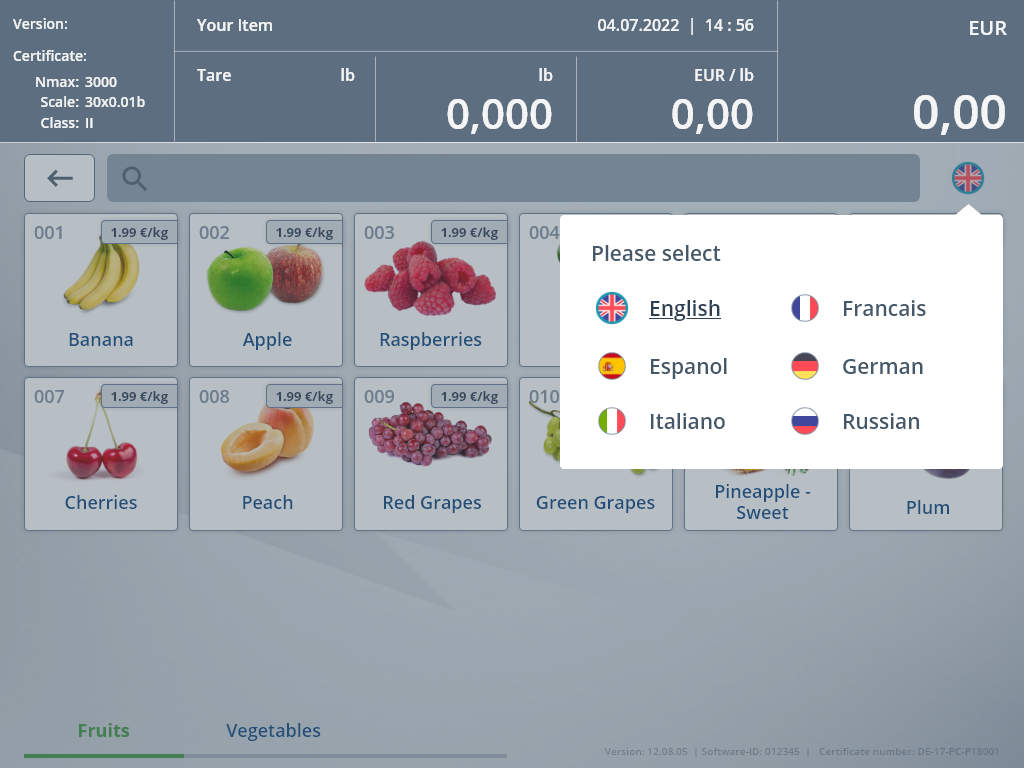
- The customer presses the language button.
All available languages are displayed.
- The customer selects a language.
The screen language changes immediately. The language popup closes automatically.
The default language is displayed in the following cases:
- after the application start
- when the weighing process is finished and a label is printed
- when a timeout occurrs
Accessing the Service Menu
Access the Service Menu as follows:
- Press the hidden button in the bottom-right corner of the item entry mask (fixed location).
The authorization mask is displayed.
- Enter your credentials.
If the authorization is successful, the Service Menu will open.
When canceling the Service Menu or after a timeout has passed, the item entry mask is displayed again.
Service Functions
| Service Function | Description |
|---|---|
| Service Tool Scale | Launches the scale service tool. |
| Device Service | Allows the operator to start and stop device drivers. |
| Zero Scale | Used to zero the scale. It is used, for example, when a different scale pan is used. |
| Out of Order | If the scale is out of order, use this function to prevent customers from using the scale. |
| Screen Cleaning | Call this function when the touchscreen is cleaned to prevent any buttons from being pressed during the cleaning process. The function is closed after a configurable timespan has expired. |
| App Info (POS) | Shows information on the current POS version. |
| Scale Info | Shows information on the current version of the scale module. |
| End Program | Shuts down the POS software. As an option, before stopping the software, a confirmation prompt and a password prompt are displayed. |