Performance Improvement
While using an equipment, you could face issues with regard to its process or maintenance. To get suggestions or a solution, you can create an improvement request. By creating this request, you involve the relevant stakeholders who can collaborate and provide you with a suggestion or even a solution.
If stakeholders within your organization can resolve your request, create an internal improvement request. If you want to involve stakeholders outside your organization, create an external improvement request.
-
Requester: The user who requests for a suggestion or a solution by creating an improvement request.
-
Reviewer: The user who reviews the improvement request sent by the improvement requester.
-
Provider: The user who suggests a solution for the improvement request sent by the requester.
-
Create, Review and submit an improvement request
-
Complete or reject an improvement request
Completing an Improvement Request -
Resubmit an improvement request
Resubmitting an Improvement Request -
Confirm an improvement request
Confirming an Improvement Request -
Reopen a confirmed improvement request
Reopening a Confirmed Improvement Request
|
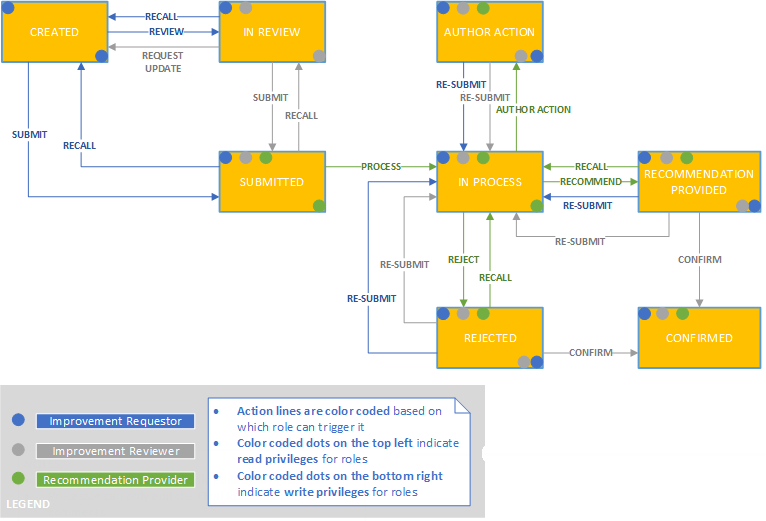
Status |
Description |
|---|---|
|
Draft |
The requester has created an improvement request. |
|
In Review |
The requester has created an improvement request and sent it to the reviewer for review. |
|
Submitted |
The requester has submitted the improvement request to the provider; OR The reviewer has submitted the improvement request (created by the requester) to the provider. |
|
In Process |
The improvement request is being processed by the provider. |
|
Author Action |
The provider sends the improvement request to the reviewer or requester for more details. |
|
Rejected |
The provider has rejected the case as invalid. |
|
Completed |
The provider has provided a suggestion or a solution. |
|
Confirmed |
The reviewer has closed the case after it was processed by the provider. |
The following figure illustrates the process flow of an improvement request between an requester, reviewer and the provider: