
 A2A Integration

With this variant, SAP NetWeaver supports a message-based and standard-based integration of internal company processes by seamlessly connecting SAP and non-SAP applications.
Architecture of the IT Scenario Variant
The following figure provides an overview of the architecture of the variants:
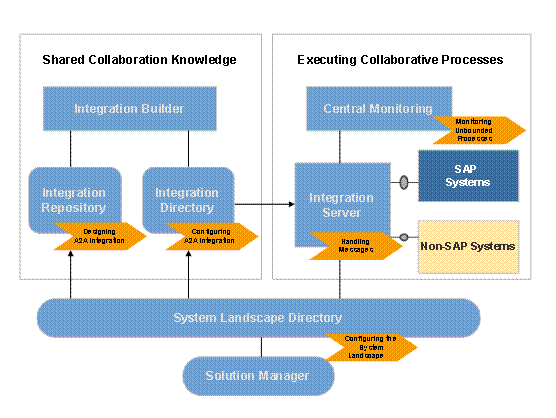
SAP Solution Manager and SAP System Landscape Directory are used to model and configure the entire system landscape, including the application systems involved.
You use the Integration Builder to design and configure your A2A integration.
The Integration Server handles the entire message processing.
The central monitoring functions monitor message processing on all involved systems; SAP Solution Manager enables you to monitor your applications.
Required or Optional Installable Units
To use this IT scenario variant you require the following installable units:
● System with activated usage types:
○ Application Server ABAP and Java (AS)
○ Process Integration (PI)
● Clients:
○ SAP GUI
○ J2SE Adapter Engine (optional)
● Other:
○ Non-central Adapter Engine (optional)
○ SAP Solution Manager (optional)
For more information about the required system landscape, see the Master Guide – SAP NetWeaver 7.0 available on SAP Service Marketplace at service.sap.com/installNW70.
IT Processes of the IT Scenario Variant
This IT scenario variant comprises the following IT processes:
Process |
What You Should Know… |
In this process, you manage your integration projects, configure the applications involved, and define how they are to be monitored. You also model the products, software components, technical systems, and business systems involved. |
|
In this process, you import, create, and manage the design objects that you need for your integration scenario. |
|
In this process, you configure the required integration objects. |
|
This process does not involve user actions. Incoming messages are processed and sent to the relevant receiver. A message can include integration processes while doing this. |
|
In this process, you monitor overall message processing, including throughput and performance for the involved components. Furthermore, you use SAP Solution Manager to monitor the business objects in your business application. |
Additional Information
The following guides contain further information about this IT scenario:
Task |
Guide |
Installation |
For more information about installing the optional non-central Adapter Engine, see the Installation Guide − J2EE Adapter Engine (PI/XI) for SAP NetWeaver 7.0 available on SAP Service Marketplace at service.sap.com/installNW70. |