 Stock Element Infrastructure
Definition
Assignment of a force element to a plant, MRP area, and storage location for managing the inventory of non-consumable goods that are used to set up the infrastructure.
Use
For a force element, you maintain material as the infrastructure material, which represents non-consumable goods and is used to set up the infrastructure. This material is compared to the authorized materials , which are indicated as infrastructure material using the material indicator, as actual.
Force Element Accountable for Infrastructure Material
A force element that is indicated as
accountable for infrastructure material
has an MRP area (infrastructure material MRP area) with associated storage locations for the inventory management of infrastructure material, which can also be used temporarily by other force elements (and if necessary also by the force element in question).
This force element also has a storage location (infrastructure material storage location) in which material used by the force element is held.
Force Element Utilizing Infrastructure Material
This force element temporarily receives material from a force element that is accountable for infrastructure material
.
It holds this material in stock in a separate storage location (infrastructure material storage location).
For more information, see Inventory Management of Infrastructure Material .
Structure
The following fields and pushbuttons are available in the
Structures Workbench
on the
Stock/Provisions
tab page in the
Stock Element
Infrastructure
screen area:
Plant
The plant to which the force element is assigned.
Infrastructure Material Mgmnt
Indicates that the force element is accountable for material that it can make available to other force elements. If you set this indicator, you can create an MRP area for the force element with storage locations.
MRP Area
For the assigned plant of a force element accountable for infrastructure material, you create an infrastructure materialMRP area with the relevant storage locations and assign these to the force element.
You create this MRP area in much the same way as for a stock element . When the name is assigned, the suffix_Ris used.
Stor. Loc.
The infrastructure material storage locationto which you can post infrastructure material for temporary use. To create this infrastructure material storage location, choose
Create Stor.Loc.
You can assign this storage location only if the force element status is not set to
Active.
MRP Area
and
SLoc pushbuttons
When you have made these assignments, you can:
Choose
MRP Area
to display the stock of actual materials for the entire MRP area of a force element that is accountable for infrastructure material.
Choose
SLoc
to display the stock of actual materials in the infrastructure storage location of the force element.
The plant, infrastructure material MRP area, and infrastructure material storage location can be changed only when they have the status
Planned
.
Storage
The following stock-element infrastructure data is stored in table /ISDFPS/FORCE:
Assignment to plant
Infrastructure Material Mgmt
indicator
Assignment to MRP area
Assignment to infrastructure material storage location
Example
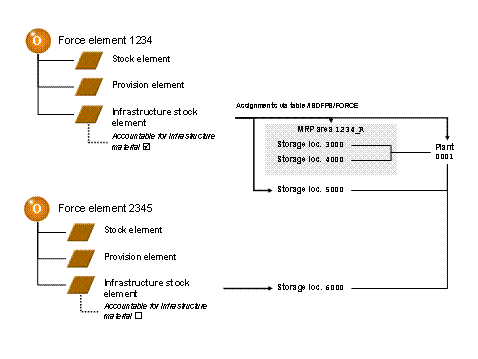
Stock Element Infrastructure
This example displays the accountable force element1234with one infrastructure material MRP area and two assigned storage locations. Infrastructure material that is used by this force element is posted to infrastructure material storage location5000
Force element2345does not hold any infrastructure material in stock, but receives it from force element1234, which is accountable for infrastructure material. The infrastructure material is then posted to infrastructure material storage location6000temporarily.