 Multiline Planning Using the LP Procedure
Purpose
You use multiline planning to plan line networks with one or more groups of alternative lines . You can use the LP procedure in the long to medium-term horizon.
The planning run uses this procedure to create period packages which are already assigned to the actual processing paths of the line network. The system uses these period packages to create planned orders with lot size 1 and exact start and end times in the short-term horizon (with the genetic algorithm, for example).
Prerequisites
You have created the iPPE data in the DI System, transferred it to APO and have completed the master data in APO. See also: Maintaining Master Data
You have defined the first segment of the line network as the planning segment by setting the planning segment indicator at the first line or at the first group of alternative lines (if this represents the first segment of the line network).
In Customizing for Model Mix Planning, in workstep
Defining the LP Procedure
, you have checked the optimization parameters.You have created a procedure package where you use the LP procedure for the medium-term horizon. You have set
Requirement-oriented, cumulated per day or per shift
as the planning basis. See also: Rules for Creating a Procedure PackageFor the spacing restriction, K-in-M restriction and position restriction, you have defined the
Conversion to the quantity restriction –
if these are to be included in multiline planning. See also: Including Restrictions in Planning
Process Flow
When planning the medium-term horizon, the system proceeds as follows:
The system determines the applicable products and possible processing routes through the line network using the line/line network you entered in the initial screen of model mix planning and using the production version and the relationships you maintained in iPPE.
In a next step, the system reads the settings in Customizing and determines the planning horizon. The system calculates the available capacity of the line resources and the production rates of the lines per day for this horizon. The restrictions you defined for the lines are converted into quantity restrictions along with the rates.
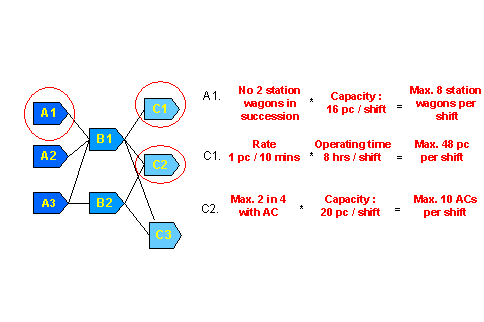
Using the LP procedure, the existing requirements are assigned to the routes per day or per shift taking the restrictions and available capacities into account.
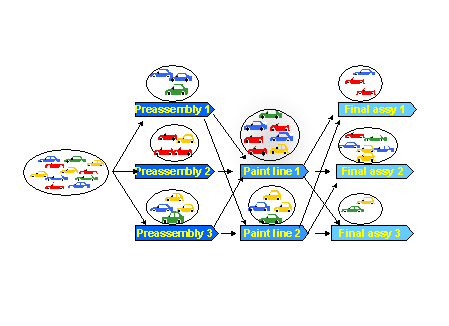
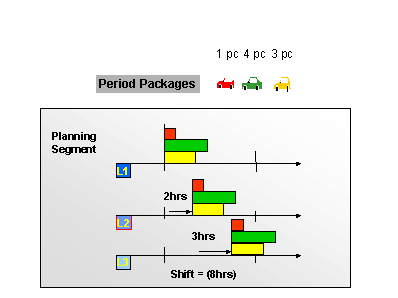
The system creates period packages for the assigned requirements. These are planned orders which all lie in the same period (day or shift). The system uses the start time of the period in which the planned orders are dispatched on the planning segment as the start time for the period packages.
Midpoint scheduling is executed for the period packages. Beginning from the start time of the order activity on the first line resource (planning segment), which lies at the period start, the system determines the start and end times of the subsequent line resources by forward scheduling using the lead times of these lines. Therefore, the start times of these order activities lie in the middle of a shift. See also: Midpoint Scheduling
Result
In the planning run, the system has created period packages for the medium-term horizon. These period packages are dispatched to the lines of the processing path. APO has created an order activity for every line which you can display in the APO planned order.
Period packages which lie in the short-term horizon are split into planned orders with lot size 1 using the procedure defined in the procedure package for the short-term horizon (possibly the genetic algorithm or the prioritized equal distribution procedure). Then in planning, the system determines the sequence for these orders with the exact start and end times.