Usage Scenario and Technical Requirements
In general, the ABAP Test Cockpit (ATC), the Code Inspector, and the quality checks are installed as part of the ABAP developement infrastructure, together with your business applications. Developers can start developing custom code, including quality analysis, right away. Both the development infrastructure and the checks always have the same version and provide a shared view of the quality of your custom code – without any extra effort.
In the case of older releases, however, a number of quality checks might not be available in your systems. For such scenarios, the ATC provides a new feature that enables the execution of the latest checks in other systems. SAP customers and partners with a CVA license can execute security checks to analyze custom code in these older releases. For example, you can analyze a SAP_BASIS 7.00 system with the latest version of security checks.
If you are using the ATC framework, the process for code analysis and correction benefits from the standard ATC functions. ATC offers a workflow for …
- Running checks for static code analysis
- Reporting and viewing check results (including documentation)
- Implementing code corrections
- Requesting and approving exemptions.
Limitation: Unlike local ATC checks in the system, it is not possible to execute remote CVA checks when releasing transport requests.
Let’s imagine that you as an SAP customer or partner are faced with the following situation:
You are using SAP systems with SAP NetWeaver Release 7.01 (for example) with their own custom code base. An upgrade of these systems is not planned so far. However, you would like to execute the latest security checks (with CVA) for your custom code and thus benefit from recent check variants that are integrated in the ATC framework. For this type of scenario, the remote static checks might be the best solution for you.
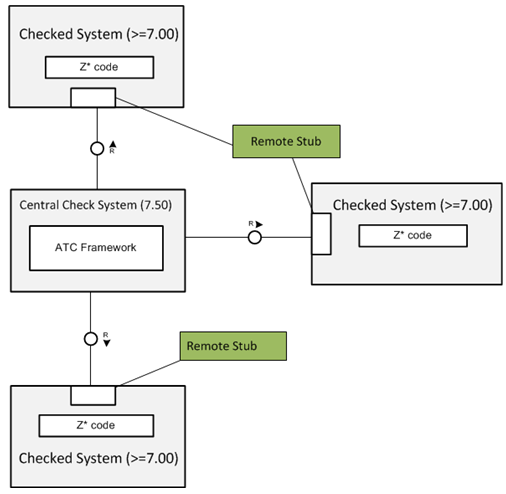
The integral part of the scenario is the Central Check System . This system is a 7.50 pure SAP Basis System (SAP_BASIS 7.50) and must be installed and configured within the SAP customer’s landscape. The Central Check System takes over the role of the master system.
For remote access, the system administrator configures RFC destinations in the Central
Check System for each relevant system to be checked by the CVA. Check
execution is triggered in the Central Check System. During execution, the
Central Check System accesses the Checked Systems by means of the
so-called Remote Stubs (RFC stubs) using the RFC connection. Remote
Stubs serve as an interface between the Central Check System and the
Checked Systems.Remote Stubs extract a model from the custom code,
which is used by ATC check in the Central Check System to detect possible
security risks in source code of the Checked Systems. Remote Stubs are
provided by SAP Note 2190113  and must be implemented in all
systems to be checked in the system landscape.
and must be implemented in all
systems to be checked in the system landscape.
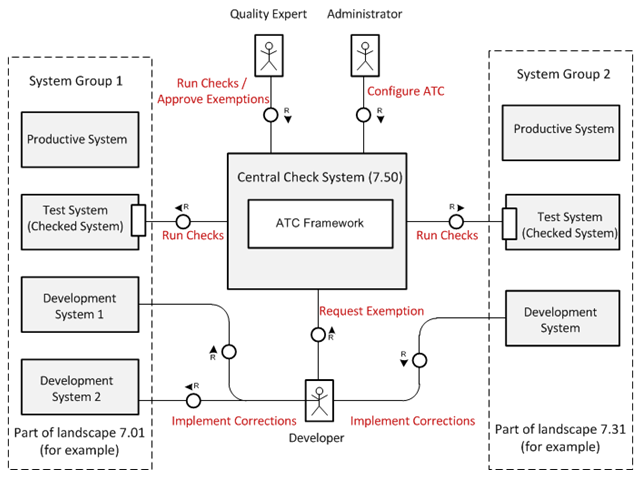
The figure below outlines the main components involved and the activities required for execution of remote CVA checks. Two system groups are defined within the system landscape. Each system group in this example includes multiple SAP systems (the Productive System, the Test System, and the Development System), which all represent a part of a system landscape of one and the same SAP release (for example, 7.01).
Keep in mind that this is only one possible option for grouping systems. Another option for subsuming systems in system groups is this: each one system group could represent the custom code of a subsidiary of your company.
The Test System includes the custom code to be checked. During check execution, the Central Check System accesses the Checked Systems by means of Remote Stubs using the RFC connection.
As result of the check execution, all the ATC findings are stored in the Central Check System. Using the ATC Result Browser in the Central Check System, you can therefore display the findings, navigate to the relevant source code and manage exemptions for ATC findings. For the navigation, the mapping from source code to development systems is used from the system group definition.
Supported SAP NetWeaver Releases
For information on supported releases, have a look at SAP Note
2190113
Authorizations for Remote CVA
Remote CVA uses the existing authorizations for the ABAP Test Cockpit, based on the following authorization objects:
- S_Q_ADM - General adminstrative activities
- S_Q_GOVERN – Activities concerning ATC quality assurance ( for example: handling exemptions) More on this: Authorizations for the ABAP Test Cockpit
Specific Configuration and System Settings for Remote CVA
Check Variant: For the execution of remote CVA checks, we recommend using the predefined Code Inspector variant SLIN_SEC. Currently, this check variant consists of CVA-enabled checks only and includes the checks Extended Program Check (SLIN) and the Security Analysis in Extended Program Check (SLIN). However, you can also use your custom check variant.
AS ABAP Administrator
- Assigning System Role in the Central Check System
- Configuring the ATC on the Central System
- Configuring Object Providers in the Central Check System
- Configuring Run Series in the Central System
ABAP Quality Expert
- Scheduling Run Series in the Central System
- Viewing Results in the ATC Result Browser
- Approving or Denying Exemptions in the Central Check System
ABAP Developer
- Viewing Results in the ATC Result Browser
- Implementing Corrections in the Development System
- Requesting Exemptions in the Central Check System