Configuring Run Series in the Central System
Prerequisites
- For the current system, the system role ATC Checks by Object Providers Only is
defined.
More on this: Assigning System Role
-
Each remote system to be checked is configured as the object provider in the Central Check System .
More on this : Configuring Object Providers
- The code inspector variant SLIN_SEC has been distributed to your Central Check System .
Context
As quality expert or administrator, you can configure an ATC run series based on object providers. The ATC run series defines which development objects in which system will be checked and by which checks. Check runs based on object providers analyze code in remote systems using the checks provided with the Central Check System .
Target Audience
- ABAP Quality Experts
- AS ABAP System Administrators
Procedure
- In the navigation pane, expand the nodes
 ATC Administration
  Runs
Runs  and double-click the Schedule Runs entry.
 The screen that appears displays a list with an existing run series.
- Specify the required data for the new series configuration.
Description
Tip You can use the template provided by the Description field. When you execute the run series, the built-in variables will be filled with data for the system, the day of the week, the calendar week, and for the year. However, you can also add further texts to these variables, re-arrange them, or replace the built-in variables with your own text.Check Variant
Enter the predefined variant SLIN_SEC for CVA checks.
Object Provider
Enter the ID of the relevant object provider that represents the remote system to be checked.
Object SelectionSpecify the set of development objects to be checked in the remote system (Checked System). The option By Query lets you specify objects by name (package names, for example), by transport layer, or by component. The option By Object Set lets you specify an object set that you have defined in the Code Inspector of the remote system to be checked.
Tip You can use the value help to choose the packages or the object set in the remote system.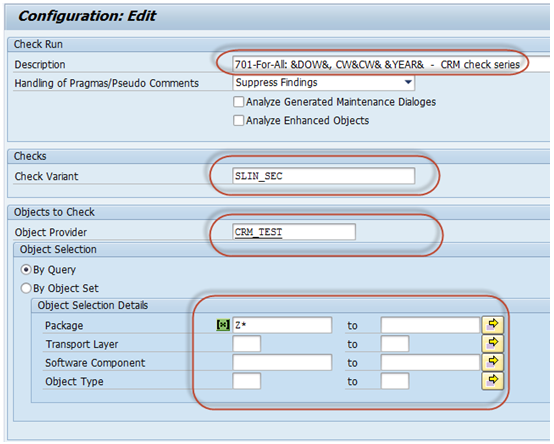 Figure 1: Dialog for configuration of a check run series