
 Web Requests
Use
A Web-based CRM Service is supported when Web requests are used. A requester can request a specific service in a Web browser using the Internet. The requester calls the Web request form intended for this, enters their specific data, and then sends the filled-in request back to the CRM system.
The submitted request generates a service order with the attribute Web request in the CRM system. The process-related data (such as business partner, processor determination, product, and so on) are managed in the service order, whilst the request-specific XML-based data are linked to the service order as a request.
The service order and request can by checked, changed and approved by a processor in the CRM service process transaction. Access to the request data – as for the requester - is via a request category view. If a Web request is relevant for billing, the corresponding line items for the payment processing are forwarded to SAP Financials.
The following graphic illustrates the business process described above:
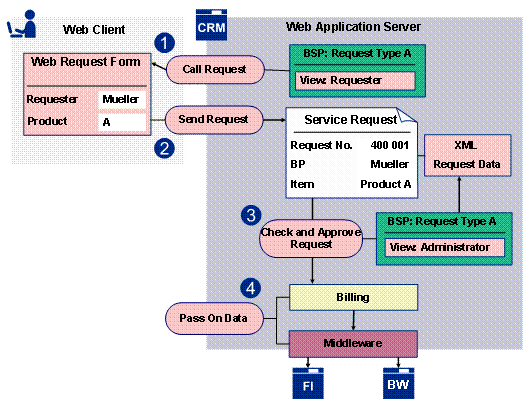
Graphic: Processing a Web-based Service Order
Prerequisites
· The CRM System is configured as a Web server.
· The relevant Web request can be executed as a BSP application and can be called from the Web page of your organization – the settings should be defined in Customizing (see Setting Up Web Requests).
· The business partner data of a requester is maintained in the CRM system, via a Self-registration -maintained Web service.
Features
Generic tools and customer enhancements are provided for the development and implementation of your own Web requests. SAP also delivers a number of sample requests in which the delivered functions are implemented as examples. (see SAP Demo Requests).
The following gives you an overview of the functions that are available for Web requests:
· XML-Based Request Form
Web requests can be executed as BSP applications in a Web browser. This displays a HTML request form based on an XML data structure. You can create a flexible layout of this request data structure using an XML editor (see request data structure).
· Request category views and authorizations
You can define a role-specific feature of the request form for a Web request by using request category views. As such, you can include additional fields in the processor view for processing requests that are hidden in the requester view. You can define authorizations at request category view (see Views and Authorization Concept).
· Stateless and Stateful BSP Application
If a Web request is intended for potentially bug numbers of requesters, performance problems can be prevented by configuring the request as a stateless BSP application (see Setting as Stateless or Stateful Web Request).
· Field Default Values in Request Form
If you want to support field default values for filling in request data (for example, business partner data), you can implement this in the Business Add-In (BAdI) CRM_SERVICE_WEBREQ. For more information, see the CRM Implementation Guide under Customer Relationship Management ® E-Commerce ® E-Service ® Web Requests ® Business Add-In for Web Requests.
· Business Rule Framework
The Business Rule Framework (BRF) provides you with a rule tool for Web requests that you can use to check and manipulate Web request data (see Business Rule Framework for Web Requests).
· Error Recovery
You can implement you own error messages using BAdI CRM_SERVICE_WEBREQ that request data is entered correctly and completely (see Error Handling in Web Request Form).
· External Interface
In addition to entering Web requests online, it is also possible to generate Web requests Offline based on an XML request file (see External Interface).
· Digital Signature
The legal validity of a Web request can be guaranteed with a digital signature. The qualified electronic signature is supported for Web requests (see Digital Signature for Web Requests).
· Saving Request Data
The XML request data of a Web request
are saved in the  Knowledge Provider
(KPro). SAP presets the content category CRM_WEBREQ by default for Web
requests. The corresponding Content Repository CRM_WEBREQ is in the SAP
database.
Knowledge Provider
(KPro). SAP presets the content category CRM_WEBREQ by default for Web
requests. The corresponding Content Repository CRM_WEBREQ is in the SAP
database.

For large
amounts of data, it is advisable to use a customer-specific content category
in connection with an external content server (see Content
Categories).
· Version Creation for Web Requests
All changes to a Web request and the original request data are saved when the versions are saved. Processors can access versions of a Web request from the service process transaction (see Version Creation for Web Requests).
· Service Order Instance
If the requirement exists that when the request form is filled in that an interaction with the data of the corresponding service order takes place (for example to be able to display the price calculation in the request form using the service order), this can be done using the service order instance (see Interaction using Service Order Instance).
· Using Web Services for Self-Registration and Master Data Changes
You can automate the processing of users and business partner roles for requesters by providing the corresponding Web services, (see Web Services for Self-Registration and Master Data Changes).
...
...
...
...
Example
One application area for Web requests is Public Administration. Municipal institutions, such as administrative bodies and authorities, can provide online public services using Web requests. For example, requests for the following:
· Resident’s parking permit
· Roadwork and small excavations
· Good-conduct certificate from the police
· Trade register extract
· Building permit