
 Business Rule Framework for Web
Requests
Business Rule Framework for Web
Requests 
Use
The Business Rule
Framework (BRF) provides you with a runtime environment for checking and
manipulating Web request data according to  BRF rules that you
can define yourself.
BRF rules that you
can define yourself.
Among other things, the BRF allows you to
· output confirmations to the requester or administrator if request data is missing or incorrect
· the automatic evaluation and preparation of requests for the respective administrator
· use BRF objects universally for several Web requests
You can use the BRF for processing both XML-based request data and service order data.
Integration
You call the BRF with the following two function modules:
· CRM_WR_BRF_RAISE_EVENT_ONLINE
This module
is designed for BRF events when
the request form is being processed. The module should be implemented with the
method FORM_ON_EVENT of the Business Add-In CRM_SERVICE_WEBREQ.
· CRM_WR_BRF_RAISE_EVENT_ORDER
This module is intended for BRF events within service order processing. The module should be implemented with an action.
Features
The integration of the BRF with Web requests and the BRF objects needed for this are illustrated below in a concrete example. In this example, the BRF checks the data entry in the request form.
1. The BRF is called when the request from is sent using the module CRM_WR_BRF_RAISE_EVENT_ONLINE that is implemented in the BAdI method FORM_ON_EVENT.
In a similar way, you start the BRF from a service order with an action using the module CRM_WR_BRF_RAISE_EVENT_ORDER.
2. The module calls the BRF event CHECK (form check). A BRF event can contain several BRF rules. The Specification for License Plate Number BRF rule is discussed exclusively below.
Each
individual rule contains expressions that
are related to each other and output a Boolean statement (TRUE or FALSE). If
the statement is TRUE; then the action assigned to the rule is executed. In
the example, the Web request expression 2REG_NUM delivers the
requester’s input value to the BRF. The input value is evaluated in the
second expression 2REG_NUM_INITIAL with the formula License plate number = ’
’ determined
there.
3.
In the example, the expressions
deliver the result TRUE (no entries were made in the License Plate Number field). In such a case, the action
2MSN_REG_NUM is triggered and so a message is transferred to the Web request
log and displayed in the request form.
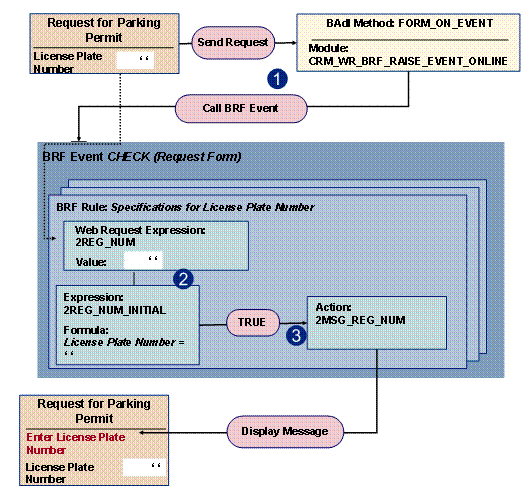
Figure: BRF Connection to the Request Form of a Web Request

The example illustrated here with the relevant BRF objects is available in the CRM system for demonstration purposes as a sample request SAP_DEMO04, as well as in the BRF application class CRM_WEBREQ_DEMO.
Generating Web Request Expressions
You must create the necessary Web request expressions to define BRF rules and read later the respective Web request data. You can either create these expressions in the BRF manually, or use the generation program CRM_WR_BRF_GERERATE_EXP. With this program, you can easily generate the necessary Web request expressions of a request category.
BRF Rules Tests in the Web Request Context
You can test the BRF rules defined for a Web request category with the test program CRM_WEBREQ_BRF_TRACE.
For more
information about the functionality of the BRF, see the documentation for the
Business Rule
Framework (BRF).
Activities
For more information about setting up the BRF for Web requests, see the Implementation Guide under Customer Relationship Management ® E-Commerce ® E-Service ® Web Requests ® Connect Business Rule Framework.