
 Digital Signature for Web
Requests
Digital Signature for Web
Requests 
Use
The digital signature of Web requests supports a qualified electronic signature. Due to their high level of security, qualified electronic signatures are recognized by many countries as a legally valid signature and are on the same level as a hand signature on documents. The digital signing of Web requests thereby enhances the usage area for electronic requests.
The person placing the request executes the electronic signature with a certificate saved on a chip card (smart card), which is read by a linked reading device whilst the person places the request in the Web client. The required certificate is issued from a recognized Trust Center (certification authority) and includes a private and public key. Whilst the constituent signs with the private key, the corresponding public key enables the signed document to be read and verified.
Integration
When executing a Web request that can be signed digitally, the basis BSP application SAPSign is called through Redirect. SAPSign controls the whole signature process. The actual signature is carried out by the person placing the request in the ActiveX-Control SAPSign Control. All functions required for the digital signature are supported in this control.
Prerequisites
· Documents are signed digitally in an ActiveX-Control. This requires a browser that supports this technically, for example MS Internet Explorer 5.5.
· People placing requests (requesters) must have access to the required hardware (smart card and reader device) as well as a valid certificate saved on their hardware. The corresponding certificates (root certificate, client certificate) are set up.
Note that software certificates, in other words, certificates that are not stored on a smart card but directly on the computer, are classified as advanced digital signatures.
Features
Generating Signable Web Requests
You define whether a Web request should support the digital signature in Customizing of SAP CRM, in IMG activity Define Request Category. For a request category, you define whether the BSP applications to be generated should support the digital signature at the level of a request category view. The generated BSP applications contain another BSP page as well as the start and confirmation page, the signature page.
Signature Page
The request data on the start page is transferred to the signature page by using the Send button when a Web request is created. The person placing the request submits their signature in the form of a digital seal on the contents of the signature page. The uniqueness of the signature is only confirmed when all of the data on the signature page matches the signature. A number of HTML tags that support the inclusion of links or graphics do not fulfill these signature-conform requirements and are not allowed in the layout of the signature page. For an overview of tags that are not allowed, see the IMG of SAP CRM, under Customer Relationship Management ® E-Commerce ® E-Service ® Web Requests ® Define Request Category using the link Digital Signature with SAP.

Note that if you do not limit the request data entry for your Web request to the start page, but distribute it over several pages, all of the request data will be transferred to the signature page. A Web request does not support a multiple-level signature process with several signatures. You can define which request data should be displayed for the person placing the request in the layout processing of the signature page.
Display and Verification of Signed Documents
Signed request data can be verified by a processor in service order processing. For this you require the action profile VERIFY delivered by SAP in IMG activity Define Transaction Types of therelevant Web request.
The request data is displayed/verified when the action is executed by program CRM_WEBREQ_SIGNATURE_SHOW . You execute the action in the SAP GUI on the tab page Overview; in the People Centric UI on the tab page Planned Actions.
For more
information on working with actions, see  Actions in CRM
Enterprise.
Actions in CRM
Enterprise.
Activities
The following explains the process of a digital signature. In order to simplify the content, the logon onto SAP CRM of the person placing the request and the start-exit function of the BSP applications were left out.
...
...
...
...
1. The requester calls the Web request (BSP application z_sign1) that supports the digital signature. The person placing the request enters the required request data on the start page and transfers it to the CRM system by pressing the pushbutton Send.
2. The request data is transferred to the signature page in a form that matches the signature. The BSP application SAPSign is called through Redirect. SAPSign starts the ActiveX-Control SAPSign Control.
The download of this ActiveX-Control to the Web client is started automatically when it is used for the first time. The person placing the request must confirm this download in accordance with the browser settings.
3. The person placing the request can find their request data to be signed in the SAPSign Control. Their personal certificate is also displayed here which was read by the connected smart card.
The person placing the request signs the displayed request data using the pushbutton Sign. The personal request data, the signature, and the public key of the certificate are transferred as an XML signature file to SAP CRM.
4. The request data is created as a service order with attribute Web Request in SAP CRM. The service order is linked to the XML signature file that contains the signed request data.
5. Based on the respective order, further processing of orders is carried out by a processor; they can also verify and sign the signed request.
The following graphic illustrates the digital signature for a Web request as described above:
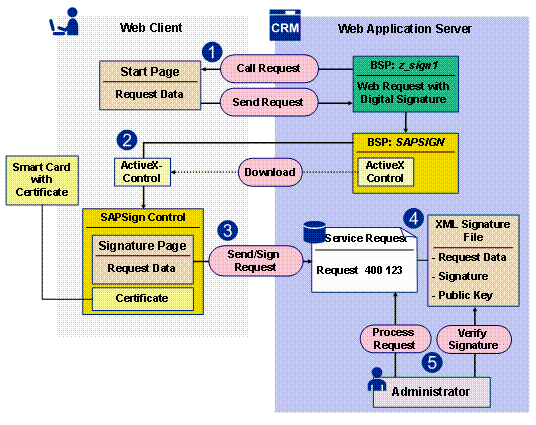
Fig. Digital Signature of a Web Request
Example
SAP delivers SAP_DEMO003 (request for parking permit with digital signature) as an example of a Web request that can be signed digitally.