 Overdraft Protection
Some banks do not allow their customers to overdraw their checking account at all, or if certain criteria are fulfilled. If the available amount on a checking account is not enough at the end of a posting day to execute all the debit postings received during the posting day, the payment items that can be returned are returned. This can, for example, mean the return of checks (PF) or debit memos. Charges can also be levied for the return.
However, the account holder may have another checking account that has an available amount that would cover the posting. This account holder may also have other accounts that could also be used. To ensure that the posting in this case is still possible, the Overdraft Protection
function enables you to determine which other accounts, and in which sequence, funds can be transfer posted to the checking account that is not sufficiently covered. You can do this according to the product or the account.
In the Overdraft Protection
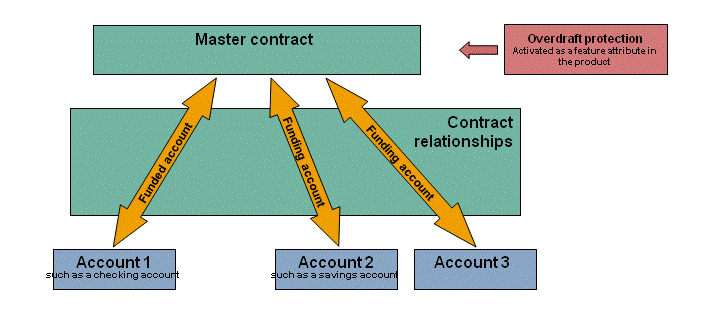
function, the account that receives a sum of money from one or more other accounts is called a funded account. The accounts from which the money is transferred to the funded account are called funding accounts.
The report Execute Overdraft Protection is available for determining the funding and funded accounts and for triggering the cash transfer. You can, for example, schedule the report in end-of-day processing.
You define contract relationships in a master contract to assign funding accounts to a funded account.
Process Combinations
 Note
Note
You can combine this process with other processes in Master Contract Management. For an overview of all combination options, see Master Contract Management (FS-MCM).
Prerequisites
Communication Between Logical Systems
The Overdraft Protection
function requires the connection of an account-managing system and a payment order-managing system to Master Contract Management (FS-MCM)
. In the standard system, Account Management (FS-AM)
is connected in both cases. You cannot connect another account-managing system. Master contracts and participant accounts must be in the same logical system.
For more information, see Communication with Logical Systems.
Settings in Customizing for Account Management (FS-AM)
To use the
Overdraft Protection
for a funded account, choose
Item Management

Basic Functions
Transaction Types and Transaction Type Groups
Maintain and Assign Transaction Types for Payment Items
 and activate the check object
 Overdraft Protection
. NoteThe check object
Overdraft Protection
checks the following:Has the funded account been assigned a rank?
Is the available amount exceeded by the posting?
Is there an outstanding account order in the
DispoOffice (FS-PCO-AM)
because of an overdraft protection problem with this account?
End of the note.
To control the further processing of the payment item if the result of at least one of the checks by the check object
Overdraft Protection
is positive, you have made the relevant settings under Item Management
Posting Control Rules
. NoteYou can set up different system responses for the checks of the
Overdraft Protection
check object. To do so, proceed as follows:In the Customizing activity
Define Error Types
, define three error types.In the Customizing activity
Assign Error Types
, assign the corresponding result numbers.In the Customizing activity
Define Main Rule Set
, specify the required first and final responses for each error type.For more information, see Example: Rules for Posting Control in Overdraft Protection.
End of the note.To ensure that the transfer amount stays reserved on the funding accounts until the posting in
Account Management
, you have made the required settings under Item Management
Prenote
Assign Amount Reservation Types to Prenote Types
. To enable a payment order to be created for the credit transfer from the funding to the funded account in
Account Management
, you have made the required settings under Order Management
Payment Order
Assign a Payment Directive Type with Transaction Types and Medium/PaytMeth
.To assign the same funding account to more than one funded account, choose
Product Management
Product Definition
Account Product
Create Account Product
or Change Account Product
and then grouping attributePosting Data
. Specify whether the ranking is to be displayed or hidden in the dialog processing of the funded account on the Posting Data tab page. You cannot change the ranking in the account.

Structure
Settings in Customizing for Master Contract Management (FS-MCM)
Under
General Settings
Payment Directive Types
Define Payment Directive Types
, you have created one payment directive type and assigned it to the process result category Overdraft Protection
underAssign Payment Directive Types to Process Result Categories
.Under
General Settings
Amount Reservation Types
Define Amount Reservation Types
, you have created one amount reservation type and assigned it to the process result category Overdraft Protection
underAssign Amount Reservation Types to Process Result Categories
.Under
Master Contract
Overdraft Protection
Define Types of Funding Accounts
, you have specified which types of account are allowed to be debited in overdraft protection.Under
Master Contract Applications
Overdraft Protection
Define Basic Amounts
, you have specified whether a minimum amount is to be taken into account in the calculation of the transfer amount, and which level amount is to be taken into account if the transfer amount is to be calculated incrementally.Under
Master Contract Applications
Overdraft Protection
Define Transfer Rules
, you have specified whether the transfer amount is to be the same as the overdraft amount or whether fixed amounts are to be transferred in increments. You also specify whether and when the system is to consider overdraft protection charges, and which exception handling applies if the available amount on the funding account does not cover the transfer amount.Under
Master Contract Applications
Overdraft Protection
Assign Transfer Rules to Funding Account Types
you have specified which transfer rules are to apply for which types of funding account.To assign the same funding accounts to more than one funded account, choose
Product Management
Product Definition
Master Contract Products
Create Master Contract Product
or Change Master Contract Product
and then feature attributeOverdraft Protection
, and specify the value range for the ranking sequence of the funded accounts.
Executing a Mass Run for Overdraft Protection
The conditions named in the Integration
section of the system documentation for the Execute Overdraft Protection report have been met.
Process
Master Data
Master Data
Create a master contract. Choose a product for which the
Overdraft Protection
feature attribute is activated. For more information, see Creating Master Contracts.Choose the
Contract Relationships
tab page and assign the funded and funding accounts. For more information, see Editing Contract Relationships for Overdraft Protection.Check the details on the
Overdraft Protection
tab page. For more information, see Editing Overdraft Protection.
Flow data

Flow data
During the posting day of the current posting date for the payment transaction, execute the postings incurred on the funded account in
Account Management (FS-AM)
. For more information, see Creating Payment Items. NoteYou normally post the payment items first that cannot be returned.
End of the note.When you post payment items, the system runs formal and material checks. If the material checks find one or more errors in the three checks above for check object
Overdraft Protection
, the system displays theLog Display
dialog box.To post the payment item despite the errors, for example, because the payment item cannot be returned, choose
 (
(Force
)Force
.To continue processing the payment item according to your settings in the posting control rules, choose
(Rule Set
)Rule Set
. If you are using thePosting Control Office (FS-PCO-AM)
, the system generates an account order of the subcategoryPostprocessing/Posting Control (05)
for each posting day and account. You can display the account order in thePosting Control Office
to monitor the processing progress.
Mass Run
The system executes the mass run Execute Overdraft Protection
at the scheduled time, for example, during end-of-day processing.
Result
If the available amount of the funding account was sufficient, all postings are made without overdrawing a funded account.
If the available amount of the funding account was insufficient, the amount by which the available amount of the funded account was exceeded, was kept to a minimum.