 Effective Cash Pooling
You can use the effective cash pooling process to optimize interest and control liquidity for business partners who have multiple accounts at a bank, such as business groups. At certain times you can transfer clearing amounts between the company's accounts and a superordinate account.
Examples:
You may have a tax advantage if you bring the balance of accounts to zero or another fixed target amount at a particular point in time (zero balancing)
If an account exceeds a particular amount, the surplus amount is transferred to the higher-level account, for example, to invest the equivalent value of this surplus.
Process Combinations
 Note
Note
You can combine this process with other processes in Master Contract Management. For an overview of all combination options, see Master Contract Management (FS-MCM).
Prerequisites
Communication Between Logical Systems
Effective cash pooling requires an account-managing system to be connected to Master Contract Management (FS-MCM)
. Account Management (FS-AM)
is connected in the standard system.
For more information, see Communication with Logical Systems.
In effective cash pooling, you can also assign external accounts to the main master contract. In this case, you need to create a shadow account in the account-managing system and assign the key of the shadow account to the key of the external account in a mapping table. The system posts the transfer amounts to the external bank account and represents incoming and outgoing payments by means of the assignment set up in its own account-managing system also.
If you are using Account Management (FS-AM) as an account-managing system, you have made the following settings:
Create an account that you want to use as a shadow account (on the
SAP Easy Access
screen, choose
Account Management

Account
Account Master Data
Create Account
 ) or choose an existing account.
Assign the external bank account to the shadow account. From the
SAP Easy Access
screen, choose Account Management
Account
Account Master Data
Assign Shadow Account
.
In Customizing for Master Contract Management (FS-MCM)
, you need to define a payment directive type for internal and external accounts, and for payment details by choosing Master Contract Management (FS-MCM)
Effective Cash Pooling
in the Customizing activity Assign a Payment Directive Type to an Assignment Type
.
Customizing Settings
General Settings
You have made the following settings in Customizing for Financial Services, under Master Contract Management (FS-MCM)
:
Under
General Settings
Assign Exchange Rate Categories for Currency Translation
, you have defined an Exchange Rate Type for credit and debit postings.If the main account and subaccount do not have the same currency for clearing, the system uses the exchange rate types defined here for the translation.
You have executed all the Customizing activities under
Master Contract Applications
Effective Cash Pooling
:
For more information about these settings, see the documentation for the Customizing activities.
Settings for Processing Group
If you want to use processing groups, you have made the following settings:
In Customizing for
Account Management (FS-AM)
under Contract Management
General Settings
Processing Group:
Define Processing Group
In Customizing for
Master Contract Management (FS-MCM)
under General Settings
Processing Group:
Define Processing Group
Define Allowed Combinations of Processing Groups
For more information about these settings, see the documentation for the Customizing activities.
Settings for Payment Directive Types
You have carried out the following Customizing activities in Customizing for Master Contract Management (FS-MCM):
Under
General Settings
:Define Payment Directive Types
:In this Customizing activity, you define which payment directive types you want to use in the context of effective cash pooling.
Assign Payment Directive Types to Process Result Categories
:In this Customizing activity, you define which posting processes you wan to run for the payment directive types in the context of effective cash pooling.
Assign Offsetting Payment Directive Types to Process Result Categories
:In this Customizing activity, you define which posting processes you wan to run for the offsetting payment directive types in the context of effective cash pooling.
Under
Master Contract Applications
Effective Cash Pooling
:Assign a Payment Directive Type to Participant Types
:In this Customizing activity, you store a payment directive type for the various types of participant accounts (main account or subaccount, within the bank or outside the bank), each as sender (funding account) or receiver (funded account).
For more information about these settings, see the documentation for the Customizing activities.
Additional Prerequisites
The conditions named in the Prerequisites
section of the system documentation for the Execute Effective Cash Pooling
report have been met.
You have carried out the following Customizing activities in Customizing for Master Contract Management (FS-MCM):
Under
Master Contract Applications
Effective Cash Pooling
:Define time periods
Define Key Dates for Time Periods
Under
Product Management
Product Definition
Master Contract Products
, you have made the relevant settings for the Effective Cash Pooling
feature attribute.
You have neither deactivated nor locked the Effective Cash Pooling
feature on the Features
tab page.
Note
Under Order Management
Payment Order
in the Customizing activity Assign Transaction Types and Medium/Payment Method to a Payment Directive Type
, you have assigned the payment directive types used here to the following transaction types if you are using Account Management (FS-AM) as your account managing system:
Payment directive type for a sending (funding) participant: Debit transaction type (for example, a credit transfer)
Payment directive type for a recipient participant: Credit transaction type (for example, a debit memo)
Process
Master Data
Create a master contract. Choose a product with the feature attribute
Effective Cash Pooling
activated. For more information, see Creating Master Contracts.Create one or more agreements on the
Effective Cash Pooling
tab page. For more information, see Editing Effective Cash Pooling.Choose the
Contract Relationships
tab page and assign the participant accounts and master contracts you require. For more information, see Editing Contract Relationships for Effective Cash Pooling.To use processing groups, choose the
Additional Administrative Data
tab page, and select a processing group from theOrganizational Data
group box.
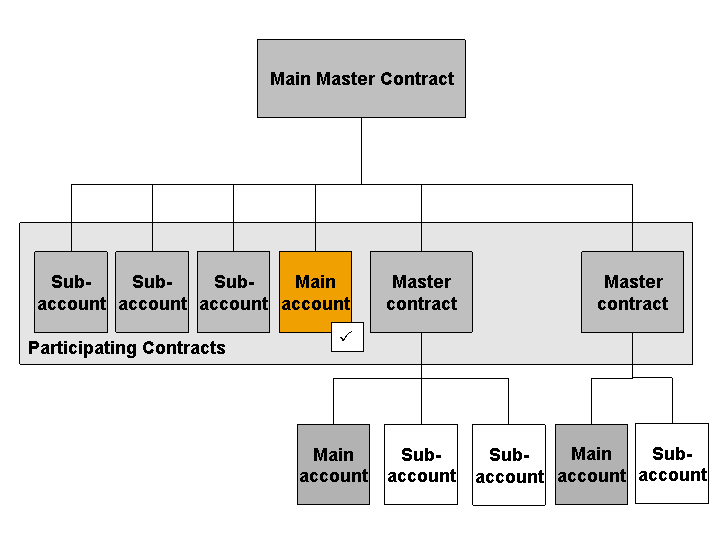
Example Structure of a Master Contract Hierarchy for Effective Cash Pooling
Participant contracts in a main master contract can be participant accounts or participant master contracts. One participant account in the main master contract must be indicated as the main account (indicator on the Contract Relationships
tab page). You can also use a payment details account as main account. All other participant accounts are automatically subaccounts.
For participant master contracts, one participant account must be indicated as the main account. This account functions as a subaccount in the main master contract. In this case, using a payment details account as main account is not possible.
Note
If you use processing groups, note that the main account must be assigned with the same processing group as that assigned to the corresponding master contract.
Settings for Methods and Agreements
You can make the following settings in the master contract:
Tab page
Effective Cash Pooling
A cash pooling agreement has a cash pooling method and time periods. The method is the same for each Cash Pooling agreement for a master contract. The time periods can differ for each agreement.
For more information, see Editing Effective Cash Pooling.
Tab page
Contract Relationships
A participant can have one or more cash pooling agreements for the master contract. You can assign one or more cash pooling rules to each agreement.
For more information, see Editing Contract Relationships for Effective Cash Pooling.
For more information about methods, see Methods for Effective Cash Pooling.

Example of the Connections Between Settings in the Main Master Contract
Flow Data
Executing Effective Cash Pooling
If you execute effective cash pooling in a mass run, the system processes the selected master contracts in accordance with the settings made in the contract and in Customizing.
Note
To provide the calculation base used to apply the rules, the system can process a maximum of 99,999 data records for each participant account. This includes, for example, entries in the balance series (in the case of balance-based methods) or items (in the case of the ITEM
method).
The following steps are carried out:
The system selects the due agreements for all participant accounts or master contracts for a main master contract and processes them using the participants and rules assigned to them. The agreements are stored on the
Effective Cash Pooling
tab page in the main master contract. NoteIf a master contract is part of a master contract hierarchy, the system first processes the due agreements on the lowest level of the hierarchy.
End of the note.The system processes the agreements in order of due date. If multiple rules are assigned to an agreement, the system processes these as follows:
First the system processes all value date-based rules (rules for which the
Value Date-Based
indicator is set in Customizing) for each value date. The priority (rule ID) defined in Customizing applies in these rules.Then the system processes all the other rules. The priority (rule ID) defined in Customizing applies in these rules.
For more information, see Rules for Effective Cash Pooling.
For more information about the mass run, see the system documentation for the Execute Effective Cash Pooling
report.
In a single run, you execute this operation for one individual master contract. For more information, see Executing Effective Cash Pooling
Creating PLM Documents
To ensure that amounts cannot be withdrawn from a participant account just before or during the cash pooling run, you can create PLM documents in the mass run for the due participant accounts.
Based on the settings of the PLM event type used, the system creates a prenote (with amount determination) or a posting lock for the account, or both.
For more information about creating PLM documents in the mass run, see the system documentation of the report for creating PLM documents. You can call this up from the SAP Easy Access
screen by choosing Master Contract Management
Effective Cash Pooling
Periodic Tasks
.
Cash Flow
 Example
The following table shows the cash flow from the lower account (funding account) to the main account (funded account):
Direction of the cash flow according to the payment directive type |
Deduct |
Add |
|---|---|---|
Order Type |
Bank Transfer |
Debit Memo |
Sender of Payment Order |
Subaccount |
Main Account |
Recipient of Payment Order |
Main Account |
Subaccount |
Example
The following table shows the cash flow from the main account (funding account) to the subaccount (funded account):
Direction of the cash flow according to the payment directive type |
Deduct |
Add |
|---|---|---|
Order Type |
Bank Transfer |
Debit Memo |
Sender of Payment Order |
Main Account |
Subaccount |
Recipient of Payment Order |
Subaccount |
Main Account |