2.6 Menus 
The Business Client menu allows quick and easy access to NWBC screens. The structure and content of the various menu entries can vary slightly depending on the product as well as on the configuration settings.
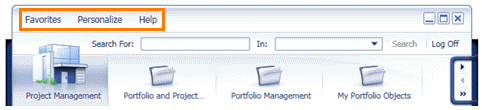 (Example of NWBC menu)
Favorites
In the Favorites menu there are functions for adding, displaying, renaming, and deleting entries of your favorites list. In addition, under _Recent, you can see a list of the last objects accessed by the user. By clicking on an item you can navigate to it quickly.
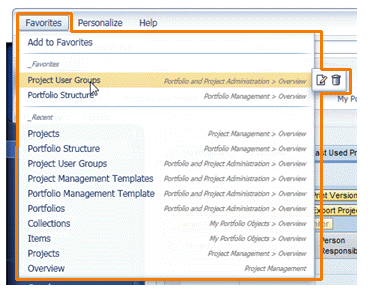 (Example of Favorites menu)
Menu Entry |
Action |
|---|---|
Add to Favorites |
Adds the screen currently displayed in the application content area to the favorites list |
Favorites list |
Alphabetical list of screens that you have saved as favorites. You can carry out the following actions for each entry:
|
The rename and delete icons in the favorites list only appear when you pass the mouse pointer over the entry you want to change.
The favorites are stored in NWBC.fav in the file system on your local PC:
Microsoft Windows XP: Documents and Settings\<user id>\Application Data\SAP\NWBC\NWBC.fav
Microsoft Windows Vista and Microsoft Windows 7: <drive>:\Users\<user id>\AppData\Roaming\SAP\NWBC\NWBC.fav
Personalize
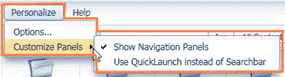 (Personalize)
In the menu entry Options... of the Personalize menu, you can make global configuration settings for the client. For more information, see 3.4 End-User Configuration and 3.5 Administrator Configuration.
In the menu entry Customize Panels you can specify that navigation panels are shown and that the Quick Launch is displayed instead of the search bar.
If you have specified your own menu entries for the Personalize menu, they will appear merged with the predefined standard entries. For more information, see 5.9 Menu.
Help
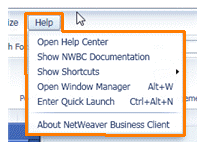 (Example of Help menu)
In the menu entry Help you can access the help system.
Menu Entry |
Action |
|---|---|
Open Help Center |
Opens a window with the side panel in which you can call up the help center with the Knowledge Warehouse documentation for the application. For more information on the help center, see Utilizing the Help Center for SAP Business Suite Applications and Making the Help Center Available for SAP Applications. |
Show NWBC Documentation |
Opens the complete NWBC documentation (PDF file) |
Show Shortcuts |
Lists all shortcuts (plus the corresponding functions) that are available |
Open Window Manager |
Only visible if you've activated the window manager. For more information, see 2.5 Multi-Windows. |
Enter Quick Launch |
Activate Quick Launch for one quick navigation |
About NetWeaver Business Client |
The same information about NWBC version, user name and backend system that is displayed if you click on the SAP logo at the bottom of the screen. For more information, see 2.2 Shell Overview. |
If you have specified your own menu entries for the Help menu, they will appear merged with the predefined standard entries. For more information, see 5.9 Menu.