
 Developing ABAP Applications Using Web Dynpro

Architecture of the Scenario Variant
 Web Dynpro for
ABAP is SAP’s technology for developing professional user interfaces
for ABAP business applications, and is also an elementary component of the SAP
NetWeaver technology.
Web Dynpro for
ABAP is SAP’s technology for developing professional user interfaces
for ABAP business applications, and is also an elementary component of the SAP
NetWeaver technology.
Web Dynpro has its own runtime and design time environment and is based on the SAP’s Application Server ABAP (Usage Type AS-ABAP). Central characteristics of this technology’s functions are declarative programming and the high level of reusability when using this interface technology, which speed up the design and implementation process of whole applications. The underlying powerful and flexible Model View Controller architecture allows the software layers to be clearly separated, which is reflected in the logical program objects as well as in how the Web Dynpro tools are used. Web Dynpro applications can be integrated seamlessly in the software life cycle and proven development and distribution infrastructure, the ABAP Workbench.
See also:
Web Dynpro Tools
in the ABAP Workbench
For detailed
information about architecture, see
Web Dynpro
Architecture.
Benefits of Web Dynpro
Web Dynpro rises to the challenge of providing a uniform interface for different development scenarios, also from an accessibility point of view. The model-based approach of UI development avoids increased subsequent costs for maintenance and enhancement in the long term. The separation of the UI logic and the business logic enables a flexible and dynamic portfolio of business applications to be created. Based on the ABAP platform, Web Dynpro provides a simplified development and build process for large and complex IT projects. As a result, this considerably simplifies setting up and managing development processes in local development environments combined with global consolidation mechanisms and frees up resources.
Web Dynpro offers many advantages to application developers as well as end users. User interface designers can concentrate wholly on designing the Web interface but may also enhance their own source text where necessary. The lack of dependence on client technology and the underlying internationally-used ABAP platform guarantee that the software that is developed is widely distributed. Developing in small teams is possible, yet at the same time, the locally developed components can flow into global programs. All in all, the Web Dynpro applications that are developed are forward-looking technologies consistent with SAP’s Enterprise Service Architecture ESA. For end users, working with easy-to-learn applications that have a Web Dynpro interface means they can expect increased productivity as a result of the consistent and user-friendly front end.
The SAP NetWeaver scenario variant Developing ABAP Applications Using Web Dynpro describes the procedures when you develop a user-friendly user interface for back-end functionality using the SAP ABAP development environment in the AS-ABAP. Part of this scenario variant can be using interactive Adobe forms for the Web Dynpro interface. The following processes are an elementary component when you program Web Dynpro applications and can easily be used to plan and implement the applications.
Application development scenarios with Web Dynpro
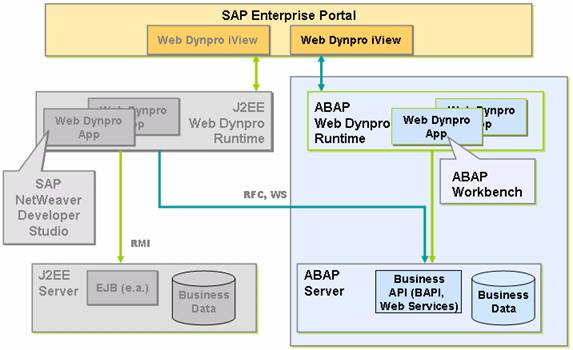
Integration With Other IT Scenarios
The scenario Running an Enterprise Portal is available for integrating the Web Dynpro ABAP application into the SAP NetWeaver Portal.
Usage Types
For the current variant, you can read the information about the following usage types in the Technical Operations Manual (TOM):
●
Application
Server ABAP (AS-ABAP)
Note that for Web Dynpro ABAP you need an AS-ABAP
with activated HTTP in the ICM as well as activated ICF services. For more information, see
Web Dynpro for ABAP
Configuration and Administration.

Executable configuration files (IMGs) are available for the configuration of this IT scenario variant. SAP Solution Manager has the capability of executing the IMG files during the configuration and management of the system landscape. The IMGs are not covered in this guide. It is recommended that you use SAP Solution Manager for this configuration.
●
Enterprise
Portal (EP)
IT Processes of the Scenario Variant
The scenario variant Developing ABAP Applications Using Web Dynpro comprises the following IT processes:
IT Processes
Process |
Process Description |
Provide business logic APIs. Structure development projects in packages. Create (reusable) Web Dynpro components. Model user navigation. Model Portal navigation. |
|
Create and implement controllers and define contexts. Design of views, define layouts and bind to contexts. Define Web Dynpro applications. Execute testing and debugging. |
|
Provide component configurations. Combine Web Dynpro components with Web Dynpro application configurations. Execute functional tests. Include Web Dynpro applications to Portal iViews and roles. |
|
Adapt configuration settings. Enhance or modify Web Dynpro components. Internationalization of Web Dynpro ABAP components. Execute end-user and load testing. Configure and personalize Web Dynpro application in the Portal. |
|
Merge new developments into productive applications. Execute end-user testing. |