
 Modeling a Web Dynpro Application
(ABAP)
Modeling a Web Dynpro Application
(ABAP)

Use of the Process
This process is part of the following IT scenarios:
IT Scenario |
Scenario Variant |
Process steps
The main purpose of this process is to model the real world business challenge into the IT application that needs to be built. Modeling the application involves deciding where the backend business logic is going reside and how it will be accessed; how the project will be structured from change management and development perspectives, so that the components of the application are reusable in nature; and how the inner navigation (within an application - events perspective) and outer navigation (in Portal - end-user perspective) of the application would take place.
The following process steps are assigned to the modeling process for the variant.
Provide business logic APIs
Web Dynpro for ABAP is primarily a technology for creating user interface. The business logic to perform validation of user entries, to retrieve and persist business data will reside in a back-end AS-ABAP system. This could be the same ABAP system in which the Web Dynpro application is being modeled or another system with connectivity from this system. Examples of business logic are: ATP-check (checking the availability of a material), validate Sales Area entered by the user, Calculate Tax rate, save Invoice in database, retrieve FI document from database etc…
One of the main differences between the classical MVC (Model-View-Controller) design paradigm and the Web Dynpro technology is that the ‘Model’, which stores the business logic functionality, does not reside within the Web Dynpro application. Rather, the Controller of Web Dynpro application invokes the business logic Model available in the form of BAPIs, ABAP Objects, Function Modules / RFCs, web services, or any other technology that can provide APIs for business logic. These APIs need to be identified and decision need to be made on where these reside and how these will be accessed by the Web Dynpro application.
Structure development projects in packages
Web Dynpro for ABAP components, like any other classical ABAP development objects (like reports, dynpros, ABAP dictionary objects, etc…) are assigned to packages. Packages are designed to help the development team to modularize, encapsulate and decouple units in the SAP system. Furthermore, this structure helps in transporting the development objects and the changes to other systems for further consolidation, testing or productive use.
The Package Builder (transaction SE21) can be used to create and structure the packages. During the modeling process, Web Dynpro projects need to be structured into using these packages. The number and structural assignment of these packages are primarily based on the development team size and how the development objects are going to be managed.
Create (reusable) Web Dynpro components
The Web Dynpro programming model allows a clear separation of the three software layers presentation logic, process logic and data collection thanks to the Model View Controller (MVC) concept. This achieves a high degree of reusability. The arrangement of a Web Dynpro application into component offers even more advantages; entire application parts can be nested, for example. The components are physically created during this step in the ABAP workbench.
Typically business applications consist of several Web Dynpro components. It is very common that some of the tasks are often repeatedly used in various places of an application. From the user interface perspective, tasks like, displaying address information, line item details, partner function relationship details, message details etc… can be reused, if developed as separate components. Web Dynpro programming model inherently supports reusability by providing ability to develop components that can be interfaces from other components using the component Interface. Moreover, the components can be structured into UI components, Model components etc… to increase the reusability.
Model user navigation
The general navigation within the Web Dynpro components, i.e. between different views, are designed and defined in this step. First the views, which represent an area in client’s user interface, are created. Remember that the views created in this step are only empty shells and the actual UI elements, layout and the context will be created during the Developing a Web Dynpro Application (ABAP) process. The other container objects of views, like windows, view sets etc… are also created in this step.
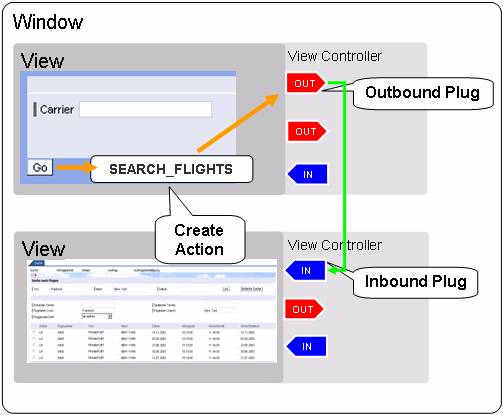
In order for navigation to take place between different Web Dynpro views, special navigation events and navigation event handlers have been created called plugs. When an outbound plug is fired, a navigation event is raised. An inbound plug is used to handle the event as a response to the event fired by the outbound plug. These inbound and outbound plugs are created to facilitate navigation in this step.
User navigation using inbound and outbound plugs
Model portal navigation
SAP NetWeaver Portal and Web Dynpro are the strategic SAP NetWeaver technologies for developing user interfaces. Both run on the Application Server (ABAP and Java) and are therefore closely linked with each other. If Web Dynpro application developers make their applications available in the SAP NetWeaver Portal, that is, they have them integrated by the portal administrator, they can make the navigation functions that are offered by the portal available to end users. An appropriate navigation between the portal applications saves time and increases the user’s productivity. Object-based navigation (OBN) is one of these portal functions: It allows access to a portal application that is based on a specific back-end business object. It also allows real-time information to be maintained about this object relating to the role of the user.