
 Creating Composite Applications

What businesses need today is the possibility to combine data and services from legacy system into flexible processes that are end user-oriented, and enable efficient collaboration across large and dynamic enterprises. For that purpose, SAP has introduced the composite application concept.
Composites are applications that make use of data and functions provided as services by back-end systems and other underlying applications, and combine these into user-centric processes and pages, supported by its own business logic and specific user interfaces.
To enable fast and easy composite application development, SAP has provided the SAP Composite Application Framework (SAP CAF). It comprises the design-time tools, methodologies and runtime environment required for building and executing composites. By using the SAP CAF, you can:
· Create services that can use data from legacy or third-party systems with SAP CAF Core
· Implement service orchestration with SAP CAP Guided Procedures (GP) as collaborative business processes
· Connect services with customizable Web Dynpro user interfaces provided by the CAF Core using the Web Dynpro perspective of the SAP NetWeaver Developer Studio.
Benefits
Among the key benefits of creating composites with the SAP CAF are:
· Composite applications effectively implement services and data from existing applications in order to initiate new business applications.
· Composite applications provide an overall view of processes, data, and information, and they simplify interaction and cooperation amongst the users.
· SAP CAF allows model-driven and template-based access to all relevant levels of the development of composite applications.
Architecture of the Scenario Variant
The following figure shows how different SAP NetWeaver capabilities interact to enable the implementation of the IT scenario variant.
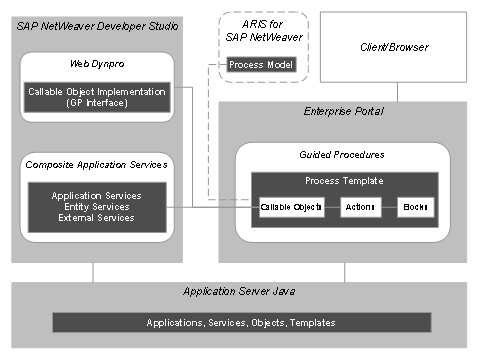
In this scenario, you create a business process model with ARIS for SAP NetWeaver. The process template and the components that build it are then designed using the tools in the Guided Procedures design time, which is integrated into the portal. The Guided Procedures objects are stored persistently in the Java server database.
To create custom applications for the process, you use the SAP NetWeaver Developer Studio, where you can build Web Dynpro components and CAF Core services that you can expose as callable objects in Guided Procedures. The applications are deployed and run on the Java server.
Required or Optional Installable Units
To use this variant you require the following installable units:
· Enterprise Portal (EP)
Provides the portal infrastructure to integrate your composite applications and make them available to the users. Includes Application Server Java (AS-Java) as well, which is required for CAF Core runtime capabilities.
· Development Infrastructure (DI)
Provides development tools that you need to create composite applications.
· Application Server ABAP (AS-ABAP)
Enables the use of the Business Process Management (BPM) runtime as the Guided Procedures processing layer.
In addition, you will work with the tools package ARIS for SAP NetWeaver when modeling and adapting composite applications. You can use these to set up and analyze your business processes. For more information on ARIS, see SAP Service Marketplace at service.sap.com/netweaver ® SAP NetWeaver in Detail ® Process Integration® Business Process Management ® IDS Scheer Partnership.
IT Processes of the Scenario Variant
The scenario variant includes the following processes:
Process |
Description |
Introduces the concepts of process modelling with SAP CAF, and the tools that you can use to model a composite. |
|
Describes how to use the tools to create services and user interfaces for composite applications. |
|
Shows how to integrate all services and user interfaces into a fully functional composite. |
|
Demonstrates how to customize a composite application, so that it meets your business requirements better. |
Related Information
The following role-specific guides provide useful information to users of the scenario:
User Role and Task |
Guide |
Installation and Upgrade |
Technology Consultant’s Guide |
Configuration |
SAP
Solution Manager or
|
Administration |
·
Technical Operations Manual (TOM):
· SAP CAF Reference Documentation: |
Process Modelling (Power Users) |
·
Power
User Guide:
· SAP CAF Reference Documentation: |
Security |
SAP
NetWeaver Security Guide:
|
Development |
SAP
NetWeaver Developer’s Guide:
|
 Creating Composite
Applications
Creating Composite
Applications