 Supply Chain Performance Measurement
Use
This SCC function allows you to track and measure your supply chain performance by retrieving information stored in the SAP Business Information Warehouse (SAP BW) pertaining to your business. Performance measurement is a way to determine if your business has improved or not. The SAP APO KPIs are metrics that measure your company's performance in specific areas. For example, a KPI could tell you what percent of your products were damaged during production. Based on that information, you could set a goal to reduce the percent of damaged goods by 5%. After implementing the steps necessary to reach the goal, you would again launch a KPI query to check your progress.
Integration
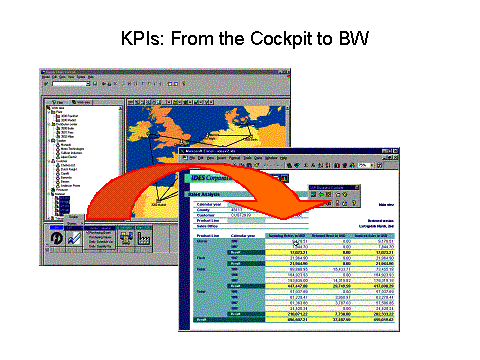
Key performance indicators are stored in SAP BW. They can be accessed from SAP APO by launching KPI queries from the Supply Chain Cockpit. The results are displayed in graphs, tables, etc. on Excel sheets.
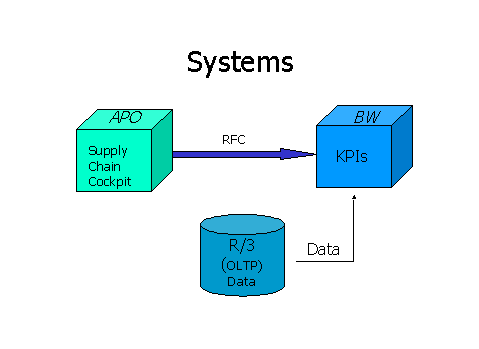
From APO, the information is retrieved through remote function calls (RFCs). The system infrastructure is illustrated below:
System infrastructure for KPIs
Prerequisites
See prerequisites listed under PerformanceMeasurement with KPIs
Data being transferred between the various systems MUST have the same name throughout. For example, product M1 in SAP APO must have the same ID as it does in R/3 because SAP BW data is R/3-based. To avoid the types of inconsistencies depicted in the examples below, when new objects are created in SAP APO, they should be named according to the naming conventions described in the SAP APO - R/3 Integration documentation:
Core Interface (CIF) Pre-settings
.
 SAP BW data is R/3-based. It is not based on the model created in the Supply Chain Engineer.
 SAP APO objects are identified by GUIDs, but in SAP BW they have the same name and ID as they do in SAP R/3 which can lead to problems. For example, if a plant is already named 0001 in SAP R/3, but is called 1000 in SAP APO, no data selection for that plant will be available in SAP BW when a query is launched from SAP APO for Plant 1000. That data is stored in SAP BW under Plant 0001.
SAP APO |
⇒ |
SAP BW |
SAP R/3 |
|
Plant: 1000 |
|
Plant: 0001 |
|
Plant: 0001 |
The number of characters in a name varies inSAPAPO andSAPBW. The following lengths are allowed in BW (1.2B; subject to change):
Product: 18
Plant, Distribution Center: 4
Customer 10
Supplier: 10
Resource: 8
Problems will also occur if a name that is used inSAPR/3 is randomly assigned to an object inSAPAPO. Consequently, the name appears in both systems but refers to completely different objects. Again, if a KPI query is launched fromSAPAPO, the data retrieved fromSAPBW will pertain to theSAPR/3 object, not theSAPAPO one.
SAP APO |
⇒ |
SAP BW |
SAP R/3 |
|
Plant: 1000 |
|
Plant: 0001 |
|
Plant: 0001 |
 Automatic mapping:
InSAPR/3, for example, the term customer applies to a variety of roles. InSAPBW, three of those roles are used:
Sold-to party
Shipped-to party
Payer
InSAPAPO, the term Customer refers to shipped-to party; however, when a Customer data transfer takes place betweenSAPAPO andSAPBW, the system automatically maps the relevant data to all three customer roles inSAPBW.
Activities
Determine what performance cycles you want to track and include the corresponding KPIs in your SCC context menu. Call up those KPIs at regular intervals to analyze your actual and historical performance data. After you analyze the data and set targets for improvement, you can adjust your plan in SAP APO and run the corresponding optimizer. Next, you execute the plan in your execution system, SAP R/3 for example. The cycle is repeated when you call up the KPI again to see the results of the execution of the plan. Basically, there are three steps to improving supply chain performance using the Supply Chain Performance Monitor:
Plan and optimize in SAP APO
Execute decisions in an execution system (SAP R/3)
Benchmark in SAP BW
To launch a KPI query from the Supply Chain Cockpit, open the SCC work area folder containing the object you wish to retrieve data on. Expand the list and locate the object. Click on the object with the right mouse button. The KPI context menus appear. Double click on the KPI to retrieve it from the BW planning book and display it for viewing.
KPIs are stored in workbooks in the BW. When you call up a KPI from the Supply Chain Cockpit, the system retrieves the data from BW and displays it in the form of an Excel sheet.
The use of metrics to measure performance is a complex business process that requires careful planning, analysis and a thorough knowledge of the supply chain. For more information about measuring supply chain performance, see the following topics:
Performance Measurement with KPIs
For more information about SAP BW, see the BW application help (20A)