

 Update Model
Definition
The update model is used both in
filling and in distribution. The data in the period prior to the selection date is not changed in the target system and the data from the selection date onward is changed. During the course of the data formatting process, the system generates a change number for the selection date. The data records are split and the old data is matched up to the new data. The system matches up the data according to the checkbox structures in the target system that you set in Customizing for Dangerous Goods Management.Purpose
By means of the update model the system fills the dangerous goods master with
dangerous goods basic data from the specification database and distributes dangerous goods master records from one source system to one or more target systems.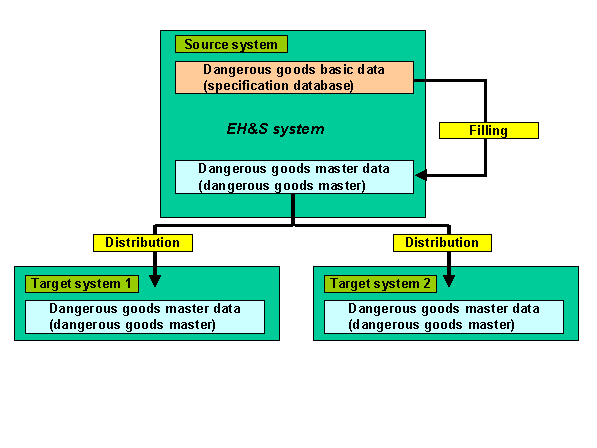
Prerequisites
Filling
In order to be able to start the filling within an SAP System, you have done the following:
Distribution
In order to be able to distribute dangerous goods master records, you have done the following:

For checking purposes you can start a
Process Flow
The following update scenario is intended only as an example and does not correspond to a valid dangerous goods regulation.
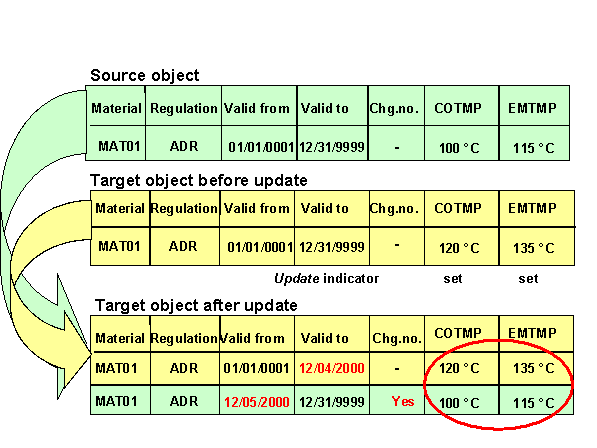
When filling or distributing, a
Generation of Change Numbers
The update model generates
change numbers for the selection date if no existing change numbers are found in the system.Result
The source object data is updated in the target system. The distributed data records are split in the target system at the selection date.