

 Distribution of Dangerous Goods Master Records: Process
Purpose
This process describes how you distribute dangerous goods master records between different systems. Source and target systems are usually SAP Systems. If non-SAP systems are used, these systems must function in the same way as an SAP System. You can use the distribution of dangerous goods master records to control which dangerous goods master records and which fields of a dangerous goods master are to be distributed to which target systems.
See also:
Update ModelPrerequisites
For more information, see:
You can use the IMG activities Specify Checkbox Structure for Dangerous Goods Master and Specify Checkbox Structure for DG Packing Requirement to define from the target systems which fields of a dangerous goods master are to be distributed.
Process Flow

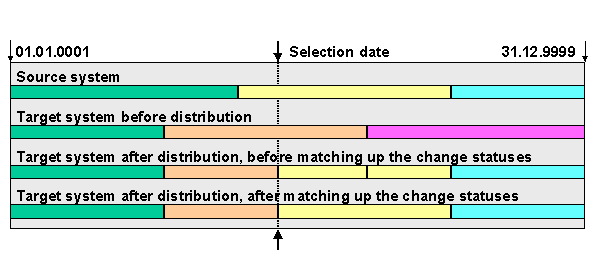
The SAP System distributes the dangerous goods data using the BAPI_DANGEROUSGOOD_REPLICATE and BAPI_DANGEROUSGOOD_SAVEREPMUL methods. These are stored in the Business Object Repository (business object BUS1078: dangerous goods).
The application document is posted during distribution.
If data does not yet exist in the target systems, it is automatically created.

For more information, see Help ® R/3 library ® CA - Cross Application Components ® CA The IDoc Interface.
Result
Data Processing
Administration
To check the data distribution, choose Tools ® Business Framework ® ALE ® Administration. You can use the following functions, for example:
 IDoc function, you can display an overview of the inbound and outbound IDocs whose data you can display and change.
 ALE outbound IDocs and ALE inbound IDocs to process the outbound and inbound IDocs.
For more information about the IDoc interface, see Help
® R/3 library ® CA - Cross-Application Components ® CA - The IDoc Interface ® IDoc Interface / Electronic Data Interchange.