

 Virtual Hosts
SAP Web Application Server offers virtual host functionality based on commercial Web servers. The term virtual server is also sometimes used.
In other Web server systems, virtual hosts allow a host to be accessible via various combinations of host names and ports. The host names here must be aliases. The computer then acts differently depending on the method of access, for example, it takes different locations in the file system as the root.

For detailed information on the concept underlying virtual hosts, see
In the SAP System, a virtual host has ist own tree of ICF services.
The procedure is explained by means of the following example.

ICM Configuration
An SAP Web Application Server is running on the computer with the host name
saphost and the IP address 1.2.3.4. The ICM is configured so that ports 1080 and 8080 can receive HTTP requests (parameter icm/server_port_<xx>). The computer also responds to the alias myhost. Therefore, both saphost and myhost are mapped to the IP address 1.2.3.4.You define whethere there should be different virtual hosts using the profile parameter
is/HTTP/virt_host_<n> = <host1>:port1;<host2>:<port2>;...;
(
<n> stands for numbers 0,1,...9). This parameter can be changed statically in the instance profile or dynamically in transaction RZ11. Transaction RZ11 also contains parameter documentation. Note that parameteris/HTTP/virt_host_0 = *:*;
is set and cannot be changed. Therefore, if no other virtual host is found, the default host number 0 is used. The default host shows up in the HTTP service tree for transaction SICF as
default_host. Initially, this is the only virtual server.To avoid namespace conflicts, all other hosts provided by SAP begin with "SAP".
Creating a Virtual Host
To create a new virtual host, take the following steps:

Note that the dynamic change to the parameter is lost at the next system restart. If you want to set the parameter permanently, you have to set this in the profile file.
As a test, create a service under
This means that under the host name
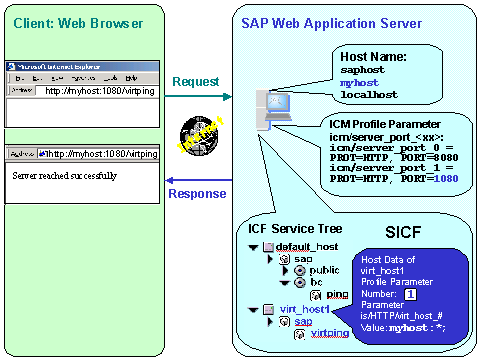
myhost on all ports to which the ICM responds (that is, 1080 and 8080), the HTTP service tree under the virtual host is the basis for searches for an appropriate URL path.Therefore, entering
http://myhost:1080/virtping would have the same effect, in this example, as http://saphost:8080/bc/ping.At this point, however, you can also assign different modes of behaviour to the various
ping services under the various virtual hosts.The prerequisites for this are shown in the graphic below:
Specifying a Default Service for a Virtual Host
You can specify a default service for a virtual host.
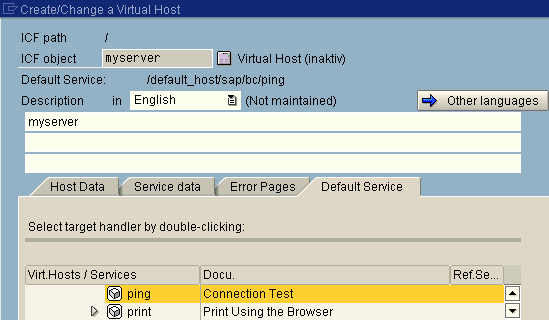
As with an internal alias (see
Internal Aliases) select a target element from the HTTP service tree. If the URL then specifies the virtual host without any additional path information, the target service that is defined will be called.