

 Internal Aliases
If you select Reference to an existing service when creating a service, you create an alias. Instead of using an HTTP request handler in the following screen, use the tab Alias-Target to determine where the alias should point to in the HTTP service tree. Position the cursor on the icon in the line and choose  (Save).

If the string of the internal alias is found in the URL of the incoming request, the service assigned to this alias, that is, the HTTP request handler defined in this service, is called. In the URL, the alias is simply replaced by the path of the service to which the alias points.

Let us assume that the HTTP service tree contains a service A with subservice B. B in turn has an alias to another service, E, which is located in a different part of the tree. 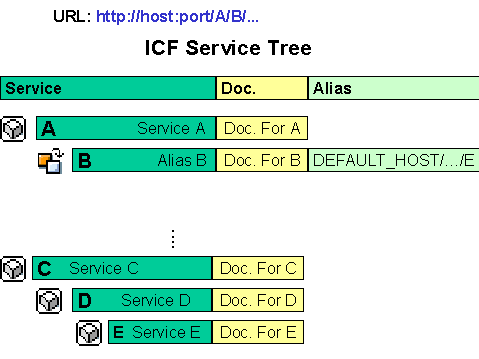
Now, if a request is received with the string A/B/, the service A/C/D/E is called, as B is simply replaced by the complete path to E.

You cannot create more subservices or subaliases underneath an alias in the ICF tree.
Internal Aliases and Logon Data
The logon data is accumulated in the sequence A/C/D/E/B, that is, the logon data from E (which can be maintained there or which can be inherited from a parent node or accumulated from several nodes) is overridden by the logon data from alias B.
Extending the Above Example
If the following properties apply to the above example, service F is executed with the logon data for B (user Bert):
Service F is then executed with the logon data from B (user Bert)
If logon data is being overridden, this can be a reason to create an alias. You may want to call an existing service with other logon data, or call a different logon procedure.
For details on logging on to the SAP System, see the following sections:
Logging On To SAP Web Application Server Anonymous Logon Data