

 Virtual Hosts - Advantages
The following example shows how working with virtual hosts can be advantageous.

A company called ACME has a host computer. The host has two network cards and two IP addresses. 1.2.3.4 and 1.2.5.6.
The address 1.2.3.4 connects the host to the ACME Intranet, while the address 1.2.5.6 connects the host to the Internet.
These IP addresses are assigned to the host names shown in the table below.
|
IP Address |
Host Name |
|
1.2.3.4 |
myhost.acme.com intranet.acme.com mailhost.acme.com |
|
1.2.5.6 |
acmegate.acme.com acmenet.acme.com |
If more than one host name is assigned to one IP addess, one host name is the default name, and the others are aliases. In the table, the default name is in bold type.
Now, a virtual host can be set up in transaction SICF for each of the two addresses. Each virtual host has its own HTTP service tree.
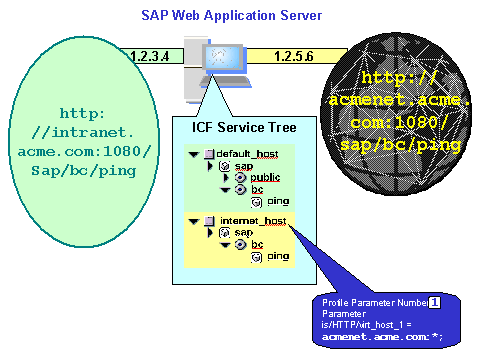
For example, you can assign requests coming from the Internet (which arrive via the host name acmenet.acme.com) to the default host, and set up a virtual host internet_host which contains the services for these Internet requests.
In this example, both servers provide the service
sap/bc/ping. If the same HTTP request handler, or an alias, is being used, this can be the same service for both servers. Different services, with different authorizations, access restrictions, and so on, can also exist under the same name (see Creating a Service).Virtual hosts therefore make it possible to separate the available services at higher levels.
See also: Interaction Model