

 Interaction Model
To understand the design of the interfaces described in detail in
ICF Interfaces, it is first necessary to be familiar with the interaction model between the client (usually a Web browser), the Internet Communication Framework (ICF), the HTTP request handler, and the application.The Internet Communication Framework (ICF) serves as the bridge between the C kernel in the SAP System and the application program (in ABAP).
The following paragraphs deal only with the server role. The client role is dealt with separately in
HTTP Communication Using the SAP System as a Client.When the ICM receives a HTTP request that is to be processed in a work process, the task handler takes over (see graphic). This starts the ICF controller. From this point on, we are only concerned with ABAP and the Internet Communication Framework. The Internet Communication Framework consists of ABAP classes and interfaces.
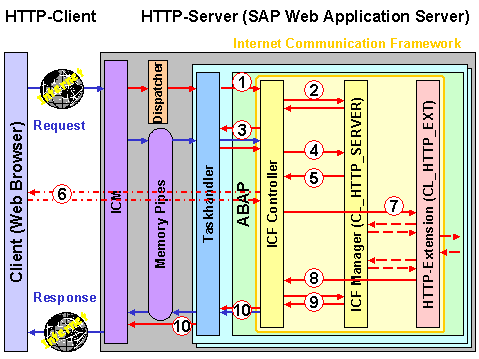
The following steps are involved in the interaction process (also refer to the graphic and the additional notes below):
 SAP Web Application Server Components).
In the graphic, the red arrows represent the control flow, and the blue arrows represent the data flow.
These steps are described in detail in the following sections: