

 Form Integration with SAPforms
Purpose
The form integration functions allow employees or customers who have never worked with SAP to use the SAP System. This includes those users, for example, who only have a MAPI mail client (Microsoft Exchange, Microsoft Outlook) or a Web browser and do not have access to SAPGUI. Using SAPforms these users can also carry out simple, recurring activities with
SAPforms forms that are specially tailored to their needs. With SAPforms and a suitable form development environment (Microsoft Visual Basic, Microsoft Outlook), you can easily create these forms and link them to the SAP System.You can edit certain types of form offline (that is, without a connection to the SAP System) using your mail client (provided that this is supported by your e-mail system). The data is transferred immediately the next time you connect to the SAP System.

Examples for the use of SAPforms forms are:
SAPforms is the interface that allows the
Integration of SAPforms FormsImplementation Considerations
To be able to use SAPforms form integration, you must
You also need a development environment for forms like Microsoft Visual Basic or Microsoft Outlook.

In addition to the SAPforms forms, there are also Web forms and forms as a separate step type available in the Workflow Builder.
Features
Starting a Workflow and Executing a Work Item
SAPforms is an interface whose primary function is to start workflows and execute work items:
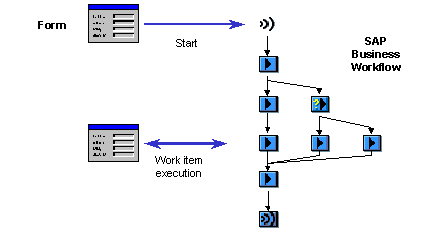
For more information, see
Starting Workflows Using SAPforms Forms and Executing a Work Item as a SAPforms Form.
