Warehouse Concepts
Warehouse Concepts
Use
There are 4 scenarios for the integration of inventory management into Funds Management. You can decide on one of the scenarios for each FM area.
This section gives an introduction to the four concepts for integrating Funds Management and Warehouse Management. Depending on the concept you have chosen, you must enter the settings in the Funds Management Customizing, in the steps Enter specific settings and Select transaction types.
Prerequisites
Independent of which concept you choose, a commitment item must be defined in the corresponding balance sheet accounts (financial transaction 30).
This is also true for those concepts in which updating is only done statistically. If the system cannot determine a funds center from existing assignments, a top commitment item will automatically be posted to during a statistical update.
For more information about assignments, read
FM Account Assignment Logic.In addition, all prerequisites listed in
Stock Material Procurement Integration apply.Concept 1
Manual purchase order account assignment determines when the budget is assigned
The consuming funds center is already known at the time of the purchase requisition or ordering.
Purchase requisitions and purchase orders to stock are recorded directly in Funds Management. To achieve this, enter the appropriate commitment item and funds center as an additional account assignment when you post.
Postings that affect the warehouse are only updated statistically. If these should not be updated at all, you must define a commitment item being unequal 30 using a financial transaction in the corresponding balance sheet accounts.
Concept 2
Budget assignments determined solely by goods issues
Purchase requisitions and purchase orders that go straight to the warehouse are not budget relevant for Funds Management. Updating is therefore only done statistically when posting purchase requisitions and orders.
The assigned values are only updated at good issue by specifying the consuming funds center in the goods issue line.
Concept 3
Warehouse funds center: Budget assignments distributed to other funds centers when goods are issued
The warehouse funds center is automatically debited and credited again.
When you post purchase requisitions and purchase orders, the assigned values in the warehouse funds center are updated automatically.
When the goods are issued, the budget assigned in the purchase order is returned to the warehouse funds center and is again available for purchasing. The assigned values for the funds center (consuming) specified in the expenditure item in the goods issue are updated.

If you choose this concept, the warehouse funds center may not be overwritten manually by another fund center during the posting of purchase requisitions and purchase orders. Otherwise the manually entered funds center will be debited and not the warehouse funds center.
Concept 4
Warehouse funds center: Additional budget assignments in goods issue to other funds centers
When you post purchase requisitions and purchase orders, the assigned values in the warehouse funds center are updated automatically like in concept 3.
When the goods are issued, the funds assignments remain in the warehouse funds center - meaning that the budget is not returned. The assigned values are updated for the funds center entered in the goods issue expenditure item. The budget for the warehouse funds center is being used up in "parallel" to the responsibility areas.
If you use the standard price procedure, it may be that "residual values" result in the warehouse funds center if the invoiced amount differs from the valuated amount of the warehouse stock.
If you work with moving average prices, then there should not be any residual values in the warehouse funds center.
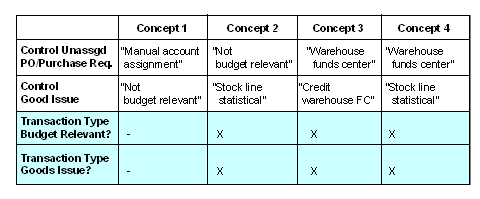
Settings in Funds Management Customizing for the Concepts
Unassigned controlling You enter the control of unassigned purchase orders/purch. requisitions and goods issue in
 Make other settings.
 You flag the movement type as a budget-relevant goods issue in
Select Transaction Types.
If you are creating your goods issue by way of a reservation, you can enter the FM account assignment in the reservation. The assigned values in the reservation are not recorded in Funds Management - meaning that no charge is made to the budget yet. The assigned values are not updated until goods are issued.
See also:
Posting Example Warehouse Concept 1 Posting Example Warehouse Concept 2 Posting Example Warehouse Concept 3 Posting Example Warehouse Concept 4