
Environment (Menu)
The Environment menu is a pull-down menu at task level. It contains functions the user can choose to call tasks or reports of other applications.
This pull-down menu is optional. It appears to the right of the Extras menu. If the Extras menu is not used, the Environment menu appears to the right of the Goto menu.
Illustration
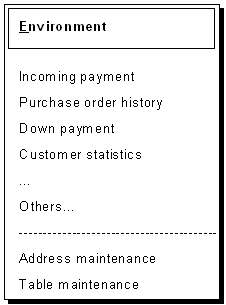
The Environment menu
Use
On the one hand, the functions in this menu should provide the user with information occasionally needed for the processing of the current object. They either call a display transaction of another application or start a report without exiting or cancelling the current processing.
On the other hand, this also includes maintenance transactions of other applications which the user occasionally needs for the processing of the objects. This integration is designed to allow an integral work process. In this case, the current object processing is also only interrupted.
Display - Maintain
The group of display functions should be separated visually from the group of maintenance transactions.
Returning to the Task
From the called task, the user should always be able to return to the interrupted task by using a constant function key (or
Back).Technical Note
To enable the user to return to the starting point after choosing an option from the Environment menu, use the statement CALL TRANSACTION (another session is opened). Do not use LEAVE TO TRANSACTION as it does not return to the starting point (the old session will be closed).
Cross-References