
Comparison of Exit, Back and Cancel
To clarify the differences between the three basic navigation functions Back,
Exit or End <application> and Cancel, the three functions are compared in the following.Graphical Comparison
The following graphics show the technical procedure for the three navigation functions; in particular, they show when error checks and confirmation prompts occur.
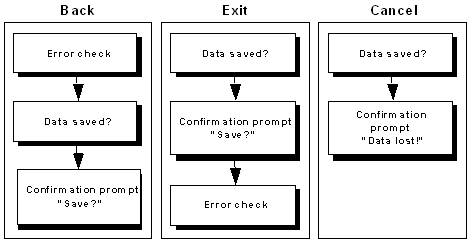
A comparison of the three navigation functions reveals that with Back and
Exit or End <application> the error check is performed at different events: With Back, the check is performed at the beginning of the processing, whereas with Exit or End <application> it is performed at the end. With Cancel, by contrast, no check is performed.Table Comparison
Criterion |
Back |
Exit |
Cancel |
Effect |
exits object |
exits task |
terminates processing |
Target |
returns to previous level |
Screen calling the task |
if possible a close screen |
Save option*) |
yes |
yes |
no |
Checks |
yes |
yes |
no |
Save option |
yes |
yes |
no |
Checks |
yes |
yes |
no |
Pull-down menu |
Goto |
<Object> |
Edit |
Function key |
F3 |
F15 |
F12 |
*) with dialog box
Dialog Box
Criterion |
Back |
Exit |
Cancel |
Title (Example) |
Back |
Exit G/L document |
Cancel G/L document |
Diagnosis text (Example) |
--- |
--- |
Unsaved data will be lost. |
Text (Example) |
Do you want to post the held document? |
Do you want to post the held document? |
Unsaved data will be lost. |
Pushbutton (Default) |
Yes , No, Cancel |
Yes , No, Cancel |
Yes, No |
Function |
POPUP_TO_ |
POPUP_TO_ |
POP_UP_TO_ |

For screen examples please refer to Prompts in Dialog Boxes.