
Duplicating Procedure
When duplicating, the term to be used is "
Copy from ".Complete Copy of Objects
From the pull-down menu on the application level, the action
Create is chosen.The functionality should not be split into Create and Create by copying because the user would be forced to make a decision at a too early stage in the process, and be led into modal creation dialog. It is more flexible for the user to choose between Create and Create by copying on the initial screen where the user can
always specify the reference number of the model object.On the full-page initial screen, the new object number is entered at the top (in the case of manual number assignment), along with other parameters. If there is enough room, you can use a block heading with the entry "Current" to improve the organization of the screen.
The object to be copied is specified in the lower part of the screen. This information is always separated from the current object information by using a group box with the heading Copy from:
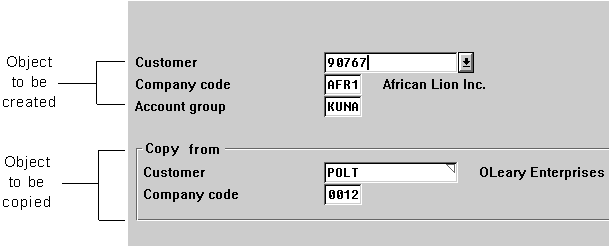
The object to be copied is specified in the lower part of the screen.
The user can proceed to the next screen by pressing
ENTER . On the follow-up screens, further information on the object to be copied is displayed only if the corresponding fields were completed on the initial screen. The details of the duplicated object are copied without any further checks. The user must check and modify them manually in the new object. Highlighting the copied information (see Highlighting) is recommended, provided no other data is highlighted and this is not all the information on the screen.Copying Object Components
The action Create is chosen from the
pull-down menu at application level, which implicitly also contains the option Create by copying.The object to be copied and options for more specific selections (for example, item, plant, vendor, and so on) are offered on the
initial screen . The selected data of the object to be copied (items, for example) is copied to the data screens of the current object with the function Copy.Dialog Options
There are three possibilities, depending on the user's input:
In the optional
selection list , all items, or only those previously mentioned are selected: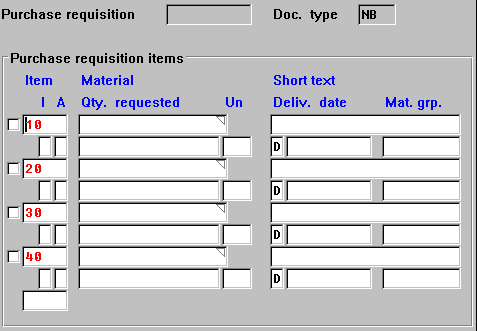
Selection list for selecting items
In the pull-down menu
Edit, the functions Select/Deselect, Select all and Deselect all should be available for this purpose.In the
newly created document , the chosen items are entered and displayed consecutively.An additional object can be copied, if required. In this case, a dialog box is displayed on the initial screen with the same contents as the model block. The action for requesting this dialog box, Copy from..., is in the left pull-down menu <Object>.
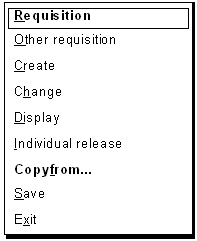
Copy from... appears in the <object> = Requisition menu.
For some document types, the creation is generally made without copying an existing document. Create by copying may only be used in approximately ten percent of all cases. In these cases, the fields in which the user is to specify the object to be copied should
not be on the initial screen. If required, it must still be possible to enter the relevant information with the action Copy from... in the pull-down menu or with the pushbutton Copy from in the following dialog box: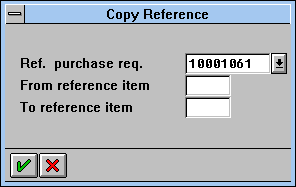
Dialog box for entering copy information