
The Sub-Component of Object Screen
Function
Sometimes there are further subdivisions of an object component from which you can choose.

In RV, a sales and distribution document consists, for example, of the object component "Business data". The "Business data" is divided here into "Order", "Dispatch" and "Billing document".
Navigation Options at Higher Hierarchy Levels
With Back, the user returns to the object component screen, with Other <object>, to the initial screen, and with Exit to "the screen calling the task".
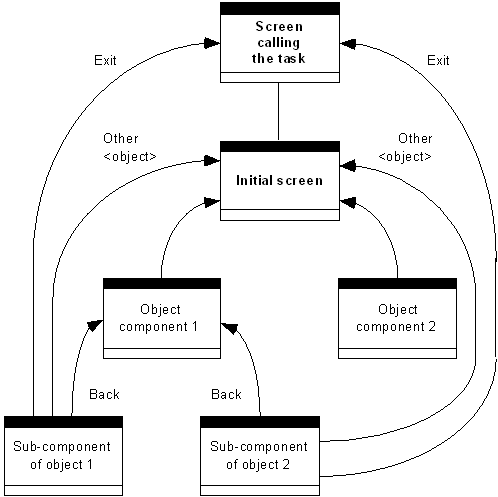
Return options in the R/3 System
If it is not possible to navigate to a higher hierarchy level - for instance, because the data is not consistent at this point in time - the function Cancel should still be supported. The data entered by the user, however, is lost in this case.
Navigation Options at Same Hierarchy Levels
The same rules as for navigating between object component screens apply.
Navigation Options at Lower Hierarchy Levels
If further hierarchy levels exist, the same rules as for navigating from an object component screen to a sub-component of an object screen apply, that is: If the subordinate hierarchy levels can be chosen freely, any functions can be defined (see initial screen); if the choice was made via a list, then the same distinction is made as on the object component list screen (see corresponding section).