Order Entry Processing
Order Entry Processing
Purpose
Order entry processing begins when the customer makes a binding confirmation (letter of indent).
The quotation leads to the generation of an order. The project-specific data determined during the processing of the RFQ and the quotation are checked, edited, and detailed with respect to the incoming order. At the same time, the incoming order triggers a series of activities within the enterprise that differ from the fictitious case of quotation creation with respect to liability.
You create a project-based payment planning. It could be that a considerable cash amount is due when the incoming order arrives.
The incoming order phase ends externally with the confirmation of the order to the customer. Internally, the sales department transfers the operational tasks to the relevant departments.
Process Flow
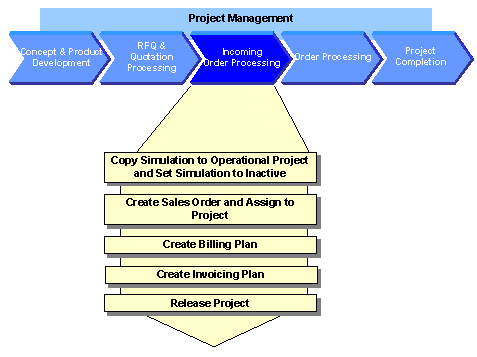
The following graphic clarifies the process:
As the customer has placed the order for the quotation on the basis of the simulation, you copy the simulation to the operational project.
You create the order with reference to the quotation so that you can adopt the already maintained data and depict a complete document flow within the system.
You maintain the order items and assign these to your project.
During a business inspection, you plan the revenues via the sales order by saving a billing plan. On the basis of the payment milestones that exist in the project, the system lists the dates for which the down payment requests and sales-relevant invoices are to be sent to the customer.
The expenditure side is especially important to the planning of project-based liquidity and financial resources. For expenditure blocks that have not yet been defined in detail, you create invoicing plans to ensure that you have the first rough planned data for the expenditures.
Releasing the Project via the Basic Engineering ConfirmationYou perform the technical inspection of the set of agreements underlying the sales order in the same way as for the business inspection. The basic engineering phase ends with the confirmation of the basic engineering acceptance. You release the entire project to production and procurement for additional processing. When you confirm this activity, the system automatically triggers the down payment for the customer. For more information, see
PS Cash Management.