
Maintenance Order Processing with Work Clearance Management
Purpose
Aspects of safety in the workplace must often be considered when executing maintenance work in order to ensure a safe working environment. These safety measures can include issuing permits for radiation protection, fire protection or lockout/tagout.
Prerequisites
In these cases, the execution of maintenance work not only necessitates the planning of maintenance tasks, but also the planning of a procedure for how to work safely on the affected parts of the system. In addition, clear communication between all the employees or departments involved in maintenance work using work clearance management is essential.
Owing to the complexity of the process, it is important to regulate all areas of responsibility clearly and assign the necessary tasks accordingly. For example, employees with special operational authorizations are required, who are allowed to issue an availability permit.
Process Flow
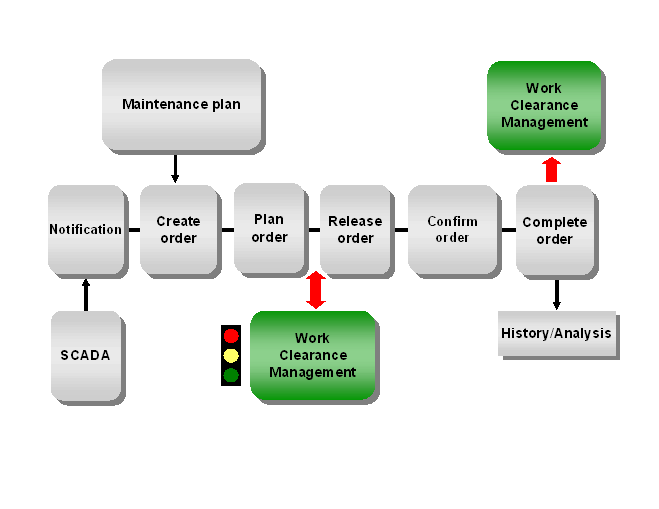
The standard process flow for order processing in the SAP component Plant Maintenance (PM) using the
enhanced model of work clearance management comprises the following steps:This can be performed manually using a malfunction report or automatically using a SCADA system in the control room, or by using deadline monitoring of maintenance plans in preventive maintenance.
You plan the activities and resources required, create a cost estimate and perform scheduling. If the work to be executed requires safety measures, you must also assign special approvals, which initiate work clearance management, to the order.
You create the necessary
During lockout/tagout, you alter the operational conditions of the technical objects, which are listed in the items of the operational work clearance documents, to ensure a safe working environment.
Once all the items have been tagged, the operational work clearance document is tagged.
Once all the operational work clearance documents have been tagged, you confirm that the lockout/tagout has been executed in the work clearance application.
Once all the safety measures have been implemented, you confirm this in the work approval.
Once the safety measures have been implemented, the status "Released for execution" for maintenance work to start can be issued.
During and after the completion of the work, you confirm the resources required (for example, materials, times, and external services) and technical findings.
After the order has been technically completed, the business completion is performed with settlement of the order. The order is then copied into the order history, where it is available for evaluations in the SAP component Plant Maintenance Information System (PM-IS).