 Integration Scenario Process for Recruiting Data
To transfer recruiting data from SAP ERP HCM to SuccessFactors BizX and vice versa, proceed as follows:
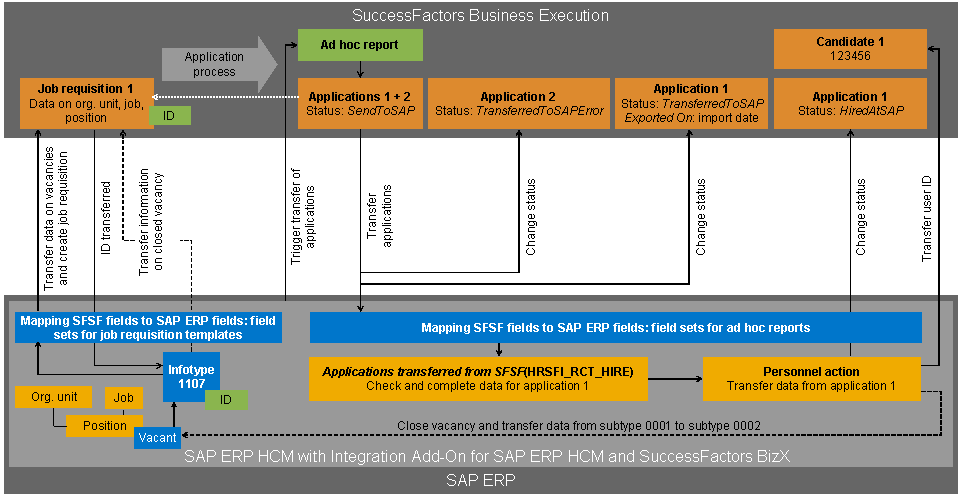
Integration Scenario Process for Recruiting Data
Prerequisites
See Transferring Job Requisition Data for Positions from SAP ERP to SuccessFactors BizX and Transferring Applications from SuccessFactors BizX to SAP ERP.
 Caution
You can transfer applications from SuccessFactors BizX to the SAP ERP system only once, where you process them further. If in SuccessFactors BizX, you change the status of applications that have been transferred successfully from TransferredToSAP back to SendToSAP, the SAP ERP system rejects these applications. Their status in SuccessFactors BizX is set to TransferredToSAPError.
If you change the data of the application in SuccessFactors BizX after data has been transferred to the SAP ERP system and these changes are also to take effect in the SAP ERP system, you need to make the same changes in the SAP ERP system that you made in SuccessFactors BizX.
Process
If a position needs to be restaffed and a job requisition is to be created in SuccessFactors BizX for this, the HR Administrator creates a record for the infotype SFSF Job Requisition (1107) for this position. To do so, he or she proceeds as follows:
If you use the infotype Vacancy (1007) in your SAP ERP system, the HR Administrator creates a vacancy for the position, and thereby a record for the infotype Vacancy. The SAP ERP system reflects this infotype record in a record of the infotype SFSF Job Requisition.
If you do not use the infotype Vacancy in your SAP ERP system, the HR Administrator creates the record of the infotype SFSF Job Requisition manually.
For more information, see Editing of Positions in the SAP ERP System to Create Job Requisitions in SuccessFactors BizX.
The implementation Change Pointer Handling for 1007 and 1107 (HRSFI_CH_PTRS) of the Business Add-In (BAdI) Updater (HRBAS00INFTY) checks all explicit and implicit changes to positions that affect the creation of job requisitions in SuccessFactors BizX, including the new infotype record that the HR Administrator has created. It stores corresponding change pointers in the change pointer table for job requisitions (table HRSFI_D_RCT_REQ).
Each change pointer reflects exactly one change. Therefore, the change pointer table contains all information that is needed to create, change, and delete records of the infotype SFSF Job Requisition. It is possible that there are multiple change pointers that need to be considered for the same position when updating the records of the infotype SFSF Job Requisition.
You schedule the report Create and Update Job Requisitions in SuccessFactors (RH_SFI_TRIGGER_JOB_REQUISITION) to be run regularly in the background.
Each time the report is run, it evaluates the change pointer table and generates records of the infotype SFSF Job Requisition.
The report uses the following criteria to determine all infotype records for which information needs to be transferred to SuccessFactors BizX:
An error occurred during the last run.
The transfer mode Forced Transfer or Postponed Transfer is set.
For more information about the transfer mode, see Infotype SFSF Job Requisition (1107) in the Structure section, under Field Part.
The status of the job requisition as it was last transferred successfully from the SAP ERP system to SuccessFactors BizX (field STATUS of the infotype SFSF Job Requisition) is different from the status that is transferred from the SAP ERP system to SuccessFactors BizX during the next transfer of data (field TARGET_STATUS of the infotype SFSF Job Requisition).
 Example
The status Open is stored in the STATUS field, and the status Closed is stored in the TARGET_STATUS field. This means that the position has been staffed in the SAP ERP system. This information needs to be transferred to SuccessFactors BizX so that the job requisition can be closed there.
End of the example.The position data has changed compared with the last run such that a delta data transfer is necessary.
ExampleThe position was assigned to a different organizational unit since there was a reorganization in your enterprise.
End of the example.
Based on your Customizing settings, the report maps the contents of the SAP ERP infotype fields to the corresponding SuccessFactors BizX fields and transfers the data to SuccessFactors BizX in packages.
For more information about the fields mapped in the standard SAP ERP system, see Mapping of SFSF Fields for Job Requisition Data to SAP ERP Fields.
SuccessFactors BizX creates a new job requisition for the position to be staffed and sends the ID of the job requisition to the SAP ERP system.
The SAP ERP system stores the ID in the infotype SFSF Job Requisition.
The SAP ERP system logs the status of the data transfer.
If the data transfer was successful, the SAP ERP system generates statistics and stores this in the log for the report Create and Update Job Requisitions in SuccessFactors and in the application log. It also sets the corresponding status (for example, Open) in the infotype SFSF Job Requisition.
If the data transfer was not successful, the SAP ERP system generates corresponding error messages. It writes the messages to the log for the report Create and Update Job Requisitions in SuccessFactors and to the application log. In the infotype SFSF Job Requisition it also sets the status Error and defines a handle for the related application log.
Applications for the job requisition enter SuccessFactors BizX.
You schedule the report Importing Recruiting Data from SFSF (RH_SFI_IMPORT_RECRUITING_DATA) in the SAP ERP system to be run regularly in the background.
Each time the report is run, it triggers a query in SuccessFactors BizX to use an ad hoc report to retrieve all applications with the status SendToSAP.
The data of the application (object JobApplication) and related data of the job requisition (object JobRequisition), candidate (object Candidate), and the last offer details (object LastOfferDetail) is transferred to the SAP ERP system.
 Note
NoteIf the ad hoc report is configured such that it also extracts applications with a status other than SendToSAP, the SAP ERP system ignores these applications.
End of the note.The SAP ERP system sends an update to SuccessFactors BizX for each application:
If the data transfer was successful, the status of the application in SuccessFactors BizX is set to TransferredToSAP and the date of the data transfer is entered in the field Exported On.
If the data transfer was not successful, the status of the application in SuccessFactors BizX is set to TransferredToSAPError. The field Exported On remains empty.
The SAP ERP system also generates corresponding error messages:
It writes the messages to the error log of the report Importing Recruiting Data from SFSF.
It sends the messages to SuccessFactors BizX. There, they are stored in the field sapError for the application.
Based on your Customizing settings, the SAP ERP system maps the contents of the SuccessFactors BizX fields to the corresponding SAP ERP infotype fields.
For more information about the fields mapped as standard, see Mapping of SFSF Fields for Application Data to SAP ERP Fields (Without Data Transfer for Job Requisition Data) and Mapping of SFSF Fields for Application Data to SAP ERP Fields (with Data Transfer for Job Requisition Data).
In the application for the further processing of imported applications (transaction HRSFI_RCT_HIRE), the HR Administrator checks the applicant data mapped to the SAP ERP infotype fields and, where required, corrects or supplements information that is required to perform a personnel action.
For more information about the transaction HRSFI_RCT_HIRE, see Further Processing of Imported Applications in the SAP ERP System.
From the application for the further processing of imported recruiting data, the HR Administrator triggers a personnel action to transfer the applicant data to Personnel Administration of the SAP ERP system.
The SAP ERP system sends an update to SuccessFactors BizX for each transferred application:
The status of the application is set to HiredAtSAP in SuccessFactors BizX.
The field Exported On contains the date of the data transfer.
If you have activated this function in Customizing, the SAP ERP system uses the personnel number of the newly hired employee to derive a user ID for SuccessFactors BizX and sends this to SuccessFactors BizX.
SuccessFactors BizX stores this user ID in the object Candidate and thereby establishes a relationship between the data for the external candidate who applied using SuccessFactors BizX and the data of the new employee who has been hired using Personnel Administration in the SAP ERP system.
Since the position is staffed, the SAP ERP system prompts the HR Administrator to close the vacancy after completing the personnel action.
NoteIf you do not use the infotype Vacancy, the record of the infotype SFSF Job Requisition is closed automatically.
End of the note.For more information, see Further Processing of Imported Applications in the SAP ERP System, in the Perform Personnel Action section.
The next time it is run, the report Create and Update Job Requisitions in SuccessFactors sends the information to SuccessFactors BizX that the position has been staffed.
SuccessFactors BizX closes the related job requisition.
The SAP ERP system transfers all data that is stored for the position in the infotype SFSF Job Requisition from the subtype Open Job Requisition (0001) to the subtype Closed Job Requisition (0002).