 Dispute Management for Invoice Submission
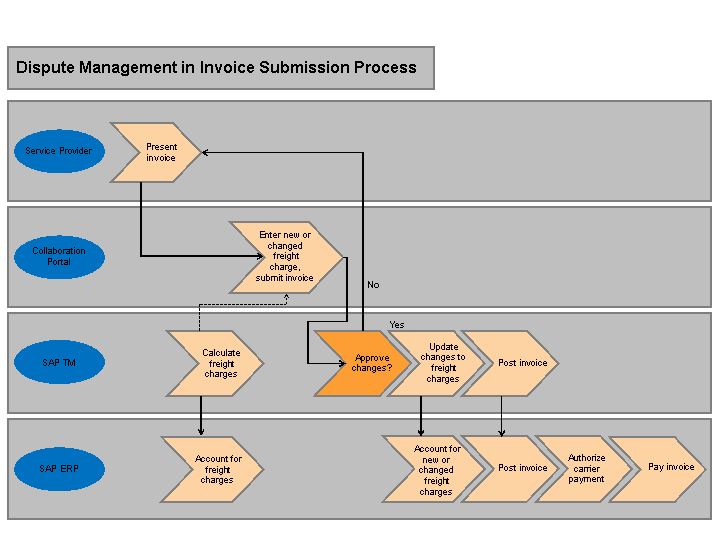
The figure below illustrates how dispute management fits in an invoice submission process and is followed by an explanation:
You can enable your service provider to use the collaboration portal for the following tasks:
Display the freight orders that have not yet been invoiced
Create an invoice for one or more freight orders that have not yet been invoiced. When submitting an invoice, your service provider can enter additional unplanned freight costs, or can propose changes to existing charges in your freight order. The system automatically creates a dispute case when your service provider submits an invoice that contains disputed items.
In addition, your service provider manually enters the tax amounts when submitting an invoice. On the collaboration portal, your service provider can enter a tax amount as follows:
For each freight order contained in a carrier invoice where the carrier invoice is a collective invoice for more than one freight order.
For each freight order stage where you have specified a calculation level of
Stage
.
Display the invoices submitted by the service provider to you, including the dispute case status of each invoice
The following are the typical steps that can happen in an invoice submission process:
SAP TM creates a freight settlement document for a freight order and transfers the freight settlement document to SAP ERP. For example, you have specified an event in your organization where the system triggers the creation and transfer of a freight order when a freight order gets into execution.
You can use the background processing function
Creation and Transfer of Freight Settlement Documents
to create and transfer freight settlement documents. For more information, see Creation and Transfer of Freight Settlement Documents.SAP ERP creates purchase order and service entry sheet (SES) entries for the freight settlement document.
Your service provider submits an invoice from the collaboration portal in line with the agreed terms you have in place with you service provider.
SAP TM creates a carrier invoice. The carrier invoice captures the invoice details submitted by your service provider. SAP TM creates a dispute case if your service provider submits an invoice in which there are charges that are different from the charges in the original freight order. The system links the dispute case to the carrier invoice.
The system does not create a dispute case if your service provider does not submit any changes against the charge amounts or logistics data in the carrier invoice.
You work closely with your service provider and either accept or reject the dispute case for the carrier invoice.
You accept the carrier invoice, where the carrier invoice does not have an associated dispute case. When SAP ERP successfully posts the carrier invoice, on the collaboration portal, the system changes the life cycle status of the carrier invoice to
Accepted
.You reject the carrier invoice, where the carrier invoice does not have an associated dispute case.
On the collaboration portal, the system changes the life cycle status of the carrier invoice to
Rejected
. You can use the note in the carrier invoice to document the reason for your rejection.You accept the dispute case for the carrier invoice.
SAP TM updates the freight order with the new or changed charges that are contained in the carrier invoice. SAP ERP uses the freight settlement document to update the purchase order and SES with the changes.
 Note
NoteYou can use the background processing function
Creation and Transfer of Freight Settlement Documents
to update the new or changed charges for the freight orders.End of the note.You reject the dispute case and your service provider agrees with the rejection. The system removes the rejected charges from the carrier invoice.
On the collaboration portal, the system updates the status of the carrier invoice to
Submitted
.In SAP TM, the system does not change the charges in the freight order, and does not create and transfer the freight settlement document again.
In SAP TM, you use the background processing function
Posting of Carrier Invoices
to transfer the carrier invoices that are ready for posting in the collaboration portal to SAP ERP. For more information, see Posting of Carrier Invoices. The system creates an incoming invoice in SAP ERP. The system transfers the carrier invoices to SAP ERP for posting only when the following conditions are satisfied:No dispute case exists or the dispute case has a life cycle status of
Resolved
.The carrier invoice has a life cycle status of other than
Rejected
.All the freight orders associated with the carrier invoice have the invoicing status
Completely Invoiced
.All the freight settlement documents associated with the freight orders have the life cycle status
Accurals Posted
.The carrier invoice has a block status of
Not Blocked
.The carrier invoice has a consistency status of
Consistent
.
More Information
Subject | More Information |
|---|---|
Structure of an individual carrier invoice on NWBC, including working with a carrier invoice | |
Necessary Customizing settings required before you can use dispute management | |
Individual aspects of dispute management | |
Details of how SAP TM updates SAP ERP | |
SAP TM collaboration portal |