
 Server
Configuration
Server
Configuration

The J2EE Engine Config Tool enables the modification of service or manager module properties. The current server configuration is scanned from the database to which you have connected and displayed in the main frame.
To connect to a different database and load another server configuration, choose File → Reload Data from DB. Enter the corresponding information according to your needs.
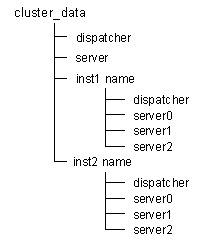
A tree structure is displayed in the left-hand tab of the main frame. The root element of the tree is the J2EE Engine cluster. It contains:
● A dispatcher and a server process

Contain the global settings for each module. These properties are for display purposes, if you change them they will not reflect upon the local properties of the J2EE Engine cluster elements.
● All instances listed
Each instance contains one Java dispatcher and a specified number of server processes (the number is specified during the installation time of the J2EE Engine). Each module contains a list of managers and services available for configuration.
J2EE Engine Cluster Structure
When a module is selected, its properties are displayed in the right-hand tab of the Config Tool frame ready for configuring.
For more information, see:
Configuring Instance Properties
Modifying Manager or Service Properties