
 Displaying DSRs/Performance Traces of the J2EE
Engine in the CCMS
Displaying DSRs/Performance Traces of the J2EE
Engine in the CCMS

Purpose
The J2EE Engine can write Distributed Statistics Records and Performance Traces over several components. You can only display these in the CCMS. For you to be able to do this, the data must run through several stations before you can display the data in the CCMS display transactions.
Prerequisites
Certain prerequisites must be fulfilled so that DSR/trace data is written for the J2EE Engine and can be displayed in the CCMS. For more information about the prerequisites, see Prerequisites/Settings for Displaying J2EE DSRs/Traces in the CCMS.
Process Flow
The diagram below shows how statistics records and performance traces are written, stored, forwarded to the CCMS and displayed in the appropriate transactions there:
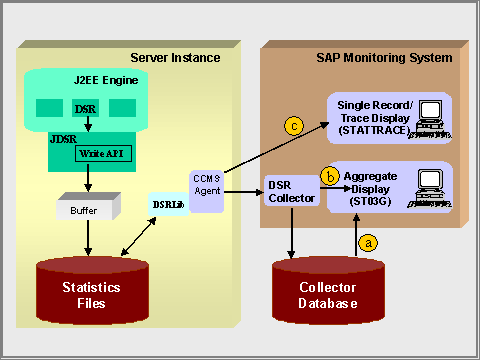
1. In the J2EE Engine, the "Distributed Statistics" service is responsible for managing the Distributed Statistics Records (DSRs). It communicates with the JDSR Write API, a library written in Java.
2. The statistics records are transferred from the memory of the host to the file system using the JDSR Write API. The statistics files are stored on the system drive on which the instrumented server node is running, in the directory path<J2EE installation directory> /prfclog/dsr and in the relevant component subdirectories there. A fixed number of files (the “file ring buffer“) is written in each component subdirectory.A new statistics file is started hourly. As soon as the maximum number of files has been written, the system overwrites the oldest statistics file.
3.
The
 agent reads
the statistics files using the native DSR Library. For the agent to query the statistics data of
components, these must be registered in the System Component
Repository.
Even if the
corresponding Java Virtual Machine is currently not active, the agent can read
unread statistics data from the component subdirectories. To do this, it looks for the corresponding
subdirectories and derives the name of the component from the directory
name.
agent reads
the statistics files using the native DSR Library. For the agent to query the statistics data of
components, these must be registered in the System Component
Repository.
Even if the
corresponding Java Virtual Machine is currently not active, the agent can read
unread statistics data from the component subdirectories. To do this, it looks for the corresponding
subdirectories and derives the name of the component from the directory
name.
4. Depending on the type of display, the agent either passes the data to the DSR collector to be aggregated (display variants a and b) or directly to the display transaction (display variant c). There are the following display variants:
...
a. Display Collector Aggregates After Hourly Collector Run
The collector aggregates the data during the
transfer.
The aggregation can
either be performed using only the DSR collector, which runs hourly in the
background (background job SAP_COLLECTOR_FOR_NONE_R3_STAT). Or you can set the agent so that it supports the DSR
collector and performs a preaggregation of the data, to reduce the load on the
collector.
The statistics
records collected by the hourly collector run are stored in the database and
displayed in the
Global Workload
Monitor (transaction ST03G). For an example of the evaluation and utilization of
Distributed Statistics Records in the Global Workload Monitor, see Performance Analysis
with DSRs.
b. Display Collector Aggregates Between Hourly Collector Runs
So that you do not have to wait until the hourly collector run to display aggregated statistics files, the Global Workload Monitor (transaction ST03G) provides the Last Minutes’ Load function, which allows you to aggregate and display statistical data during runtime without storing it in the database.

The collector has read the data that was generated between 8:00 and 9:00. If the user wants to display aggregated data collected between 9:10 and 9:20 before the next hourly collector run, he or she must specify this time period in the Global Workload Monitor (transaction ST03G) under Last Minutes’ Load. The agent reads the corresponding records. These are aggregated and displayed at runtime. However, the aggregate is not stored in the database.
c. Displaying Raw Data as Single Records and Displaying Performance Traces
With single record display (c), the raw statistical
data is displayed in the
functional
trace (transaction
STATTRACE).
You can also use the
same transaction to display performance traces, which provide a finer
granularity of statistics files.
Example
· For an example of the evaluation and utilization of Distributed Statistics Records in the Global Workload Monitor, see Performance Analysis with DSRs.
· For an example of the evaluation and utilization of raw statistical data in the functional trace, see Performance Analysis with Raw Statistical Data in the Functional Trace.