
 Monitoring with the SAP Solution
Manager
Monitoring with the SAP Solution
Manager

Use
The SAP Solution Manager, SAP’s service and support platform, helps you to implement, monitor and operate SAP Enterprise Portal efficiently with
● Timely monitoring of system components and business processes
● Periodic reporting of service levels with SAP EarlyWatch Alert data
● Enhanced message handling for fast troubleshooting by creating messages directly in the portal and sending these messages to the SAP Support back office with a direct connection
● Access to SAP Support services and to Best Practices
Integration
The monitoring technology in the SAP Solution Manager is based on functions of the Computer Center Management System (CCMS):
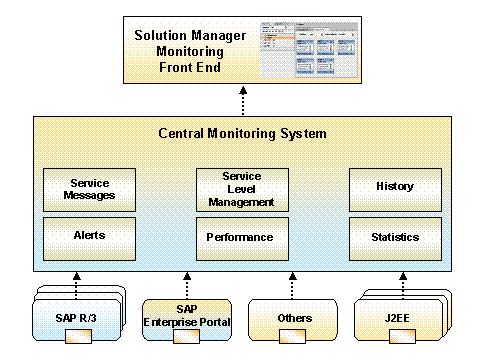
You can download the SAP Solution Manager from the SAP Service Marketplace at no cost. You need Version 3.1.
Features
You can monitor for example the following portal data in the CCMS using the SAP Solution Manager:
Monitoring of the operating system
You can monitor the following resources: virtual store, physical store, CPU, file system management, hard disk, network.
Monitoring of the performance
You can display the performance data of the portal server. The 10 completed requests and the 10 components of a portal server that have the greatest effect on the performance are displayed.

You can see detailed performance data directly in the portal in the performance monitoring functions.
Monitoring of log files with CCMS agents
Each CCMS agent can analyze log files for a given text pattern and pass the results to the monitoring architecture as an alert of a given severity.
The log files (portal logs and system logs) are displayed centrally in the Log Viewer.
Monitoring of selected processes with SAPOSCOL
With the operating system collector SAPOSCOL, you can monitor the availability of any processes. The monitor outputs the number of running processes as well as the CPU and storage requirements.
Availability monitoring (heartbeats)
You can display the availability of portal backend systems, portal servers as well as cluster nodes and URL links centrally. For more information, see Availability Monitoring (Heartbeats).
Configuration parameter reporting
The configuration parameters of the Portal-Runtime (PRT) and the Portal Content Directory (PCD) are displayed. Whether or not all the necessary services and filters were loaded is also displayed.
All the data should
be displayed marked in green. Errors when loading services or filters and
errors of portal applications are marked in red.
For more information, see Parameter
Reporting.
Alternatively, you can display the configuration parameters in the Visual Administrator or directly in the portal.
More Information
For more
information about implementing and configuring enterprise portal monitoring in
the CCMS, see
 Configuration of the
Monitoring Architecture.
Configuration of the
Monitoring Architecture.
For more information about the SAP Solution Manager visit service.sap.com/solutionmanager or see the SAP Solution Manager.
For more
information about the Computer Center Management System visit service.sap.com/systemmanagement or see the
Computing Center
Management System.