
 Parameter Reporting

Use
You can look at the general parameters of the Portal Runtime and Portal Runtime cache as well as the configuration parameters of the Portal Runtime (PRT) and Portal Content Directory (PCD). You can also check if all the necessary services and filters were loaded.
Integration
You have three ways to call the function:
1. in the Visual Administrator
2. in the CCMS with the SAP Solution Manager
3. in the Portal
Features
You can look at the different parameters and refresh the display if needed. The status of the parameters is marked with certain symbols.

The number of parameters and the use of the symbols varies depending on which of the above alternatives you are using for display.
For more information about the meaning of the individual PCD parameters, see PCDStartup.Properties Configuration File. For the PRT parameters, read the section File-Based Configuration Properties in the Portal Runtime guidelines.
Activities
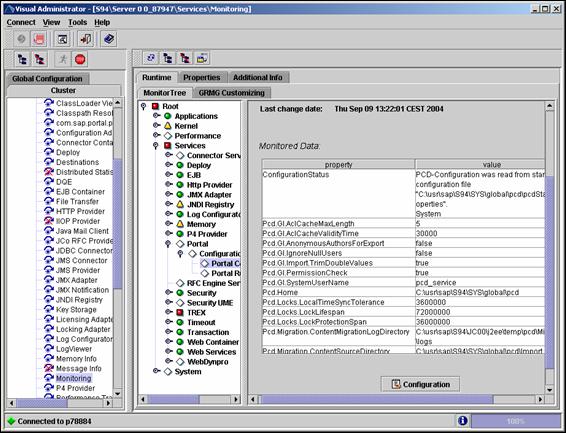
Parameter Reporting in the Visual Administrator
● Select the corresponding Server → Services → Monitoring.
● On tab MonitorTree select Root → Services → Portal.

● Open the required subnode in order to see the parameter data.
The properties are displayed in a table together with the corresponding values.
To display the configuration parameters, choose Configuration and then the entry Portal Content Directory or Portal Runtime. Node String Buffer Pool shows the data obtained when you render iViews and build pages.
By default the parameters are reported to the Visual Administrator every 10 minutes. To change this time interval:
● Choose Configuration.
● In the window Monitor Configuration click Edit and enter the required time span in minutes, hours or days.
Troubleshooting
●
The entry
Portal is missing on tab Monitor
Tree.
→ Check file monitor-configuration.xml. This file is stored in the PRT service in
com.sap.portal.prt.sapj2ee.
●
No configuration
parameters are displayed.
→ Check service com.sap.supportability.reporting in directory ..\WEB-INF\deployment\pcd.
Parameter Reporting in the CCMS
For more
information about implementing and configuring portal monitoring in the CCMS,
see
 Configuration of the
Monitoring Architecture.
Configuration of the
Monitoring Architecture.
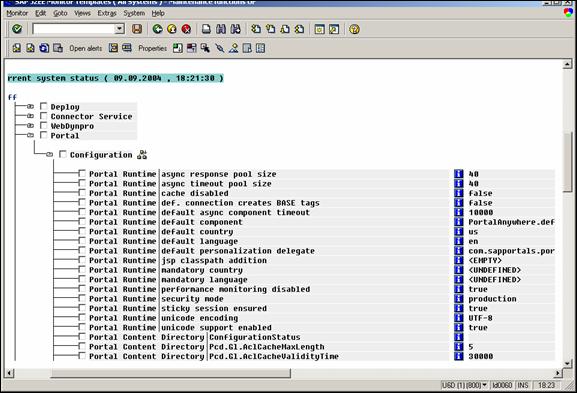
After configuration of portal monitoring in the CCMS, the parameters are displayed as follows:
● In the CCMS monitor set (Transaction RZ20) choose J2EE Monitor Templates → All Systems →<System_Name> → J2EE Engines → <Instance_Name> → Services → Portal
For more
information about the Computer Center Management System visit service.sap.com/systemmanagement or see the
Computing Center
Management System.
For more information about the SAP Solution Manager visit service.sap.com/solutionmanager or see the SAP Solution Manager.
Parameter Reporting in the Portal
To Display Configuration Parameters of the PCD:
● Choose System Administration → Support → Support Desk.
● Click the Portal Content Directory area and then on the Pcd Configuration tool.
The configuration settings of the PCD that were valid when up started the portal are displayed. To refresh the data, click Reload.

To Display Configuration Parameters of the PRT:
● Choose System Administration → System Configuration → Service Configuration
● Select Central Configuration in folder Portal Runtime.
● Click with the secondary mouse button and choose Configure.
The configuration settings of the PCD are displayed.
